---
title: "Move to MkDocs"
date: 2018-05-04
created: 2018-05-04T00:00:00Z
type: blog
status: settled
tags: [blog]
publish: [ddrscott]
source: import
image: /images/2018/mkdocs-features.png
prompt: "Import from blog post: 2018/move-to-mkdocs.markdown"
---
I've upgraded to [MkDocs][] from [Octopress][]. The [Octopress][] installation I've been using was from 2014 (4 years old) and was missing features for search, long form writing, multi-part posts, and books.
!!! note "http://www.mkdocs.org/"
MkDocs is a **fast**, **simple** and **downright gorgeous** static site
generator that's geared towards building project documentation. Documentation
source files are written in Markdown, and configured with a single YAML
configuration file.
## Features
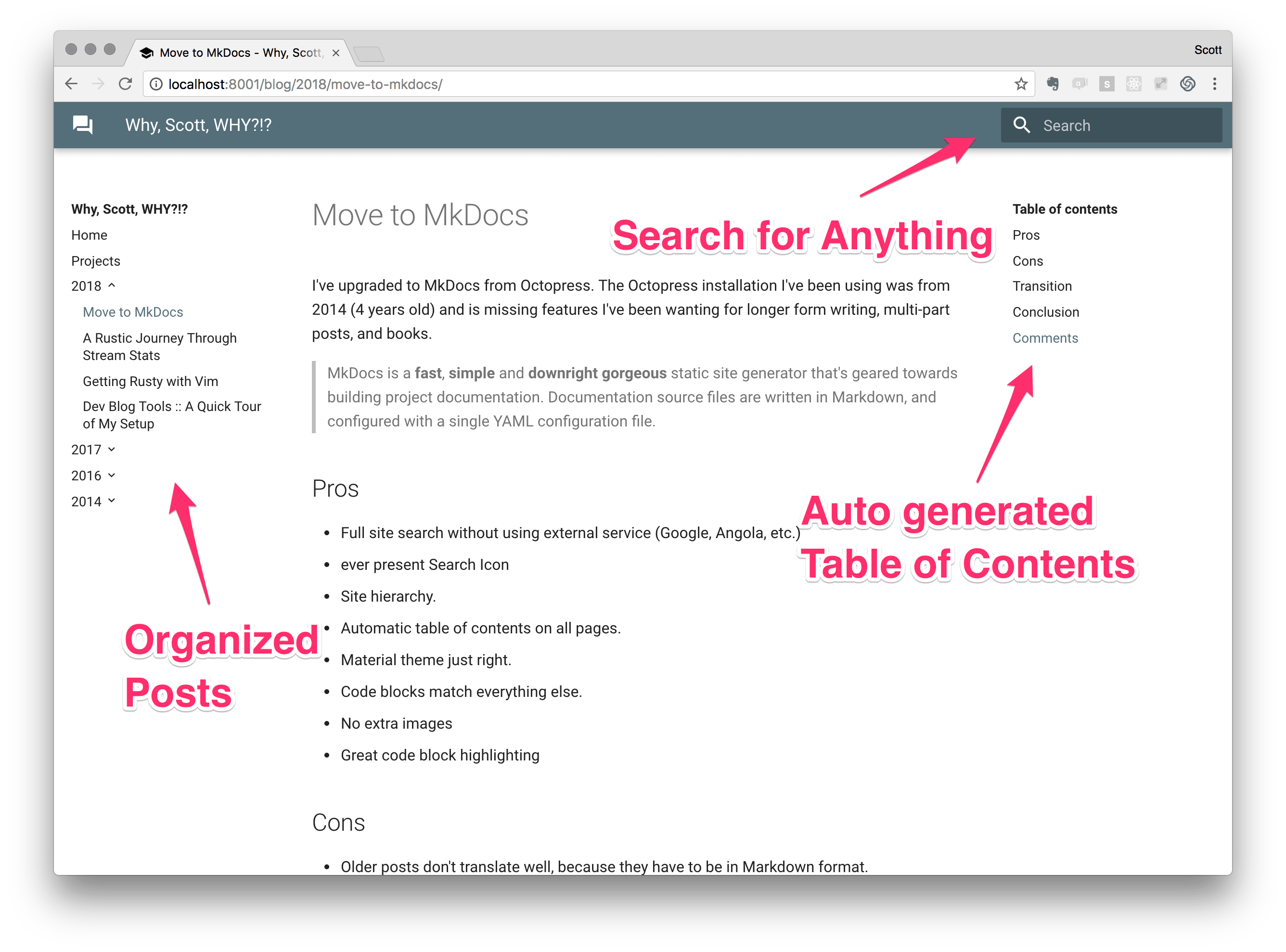
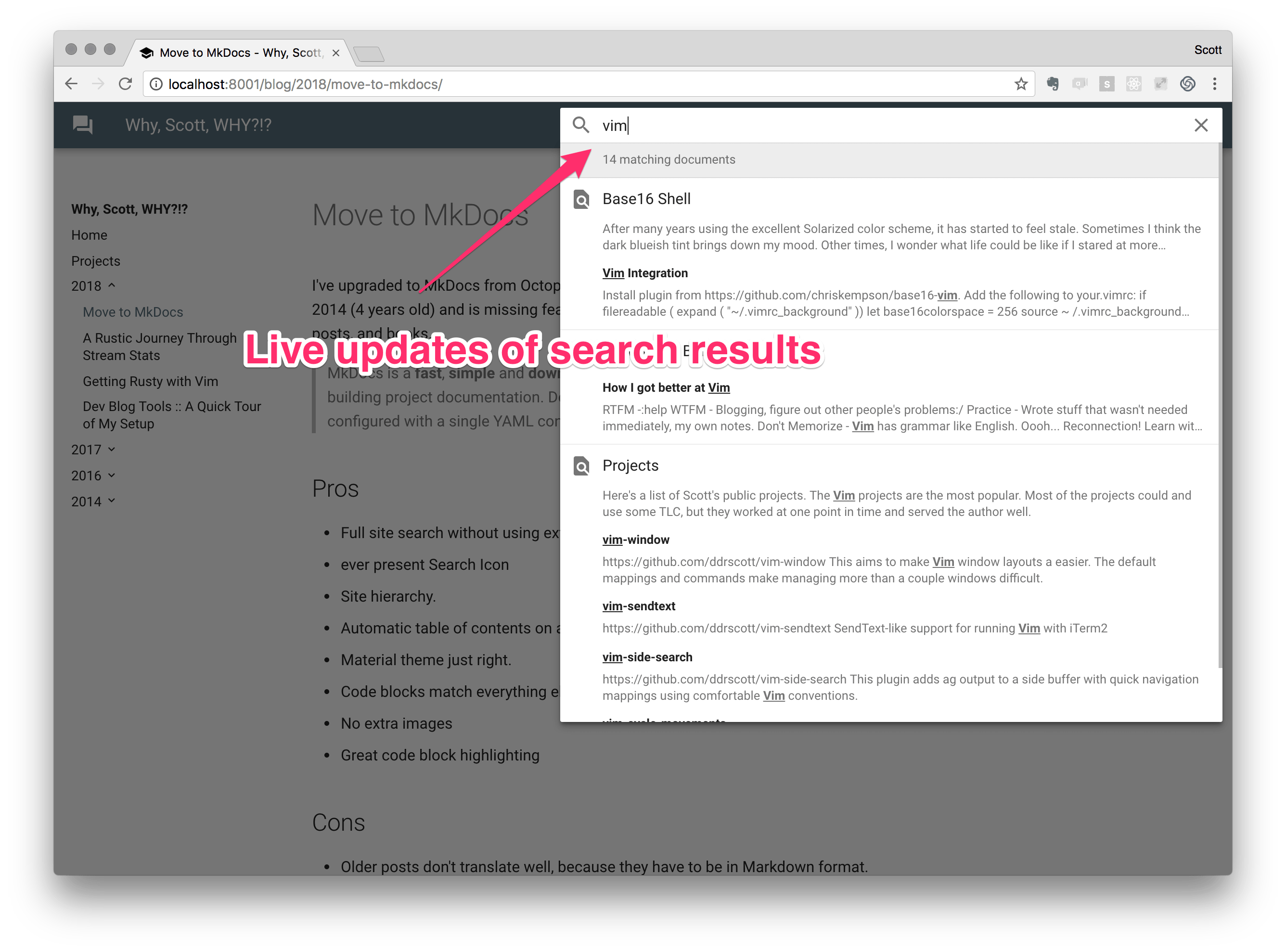
To see all the features of [MkDocs][] and [mkdocs-material] jump to their respective sites.
Here's the features really care about:
 [octopress]: http://octopress.org/
[mkdocs]: http://www.mkdocs.org/
[pandoc]: http://pandoc.org/
[mkdocs-material]: https://squidfunk.github.io/mkdocs-material/
## Transition
The migration process wasn't as easy as I'd hoped. I wanted all the old posts to move over, but there wasn't an easy path for my content prior to 2014. That's because some of those posts are in pure html and [MkDocs][] only wants to deal in Markdown. I tried [Pandoc][], but that created Markdown which isn't compatible with [MkDocs][]. It'll take some time before all that old stuff gets through. Fortunately, because it's _so_ old, most of the material isn't relevant anymore and gets very few hits.
[MkDocs][] doesn't build the site hierarchy automatically like [Octopress][]. [Octopress][] stores all article in a flat directory with file names prefixed with a date. [MkDocs][] uses the file name as part of the URL, so I needed to rename the [Octopress][] files and put them in a directory structure to match the URL format I had in the original site.
**Octopress Posts Directory**:
```
├── source
│ ├── _posts
│ │ ├── 2016-05-28-negative-modulo.markdown
│ │ ├── 2016-07-11-photography-lightening-talk.markdown
│ │ ├── 2016-07-26-ansi-codes-with-character.markdown
│ │ ├── 2017-02-07-how-to-get-better-at-anything.markdown
│ │ ├── 2017-03-08-what-the-sql-lateral.markdown
│ │ ├── 2017-03-15-what-the-sql-recursive.markdown
│ │ ├── 2017-03-22-what-the-sql-window.markdown
│ │ ├── 2017-04-10-vim-send-text.markdown
│ │ ├── 2017-04-13-base16-shell.markdown
│ │ ├── 2017-06-01-gnu-screen.markdown
│ │ ├── 2017-06-12-fzf-dictionary.markdown
│ │ ├── 2018-03-04-getting-rusty-with-vim.markdown
│ │ ├── 2018-03-12-stream-stats-in-rust.markdown
│ │ └── 2018-03-22-blog-setup.markdown
```
**MkDocs Docs Directory**:
```
├── docs
│ ├── blog
│ │ ├── 2016
│ │ │ ├── negative-modulo.markdown
│ │ │ └── yank-without-jank.markdown
│ │ ├── 2017
│ │ │ ├── base16-shell.markdown
│ │ │ ├── fzf-dictionary.markdown
│ │ │ ├── gnu-screen.markdown
│ │ │ ├── how-to-get-better-at-anything.markdown
│ │ │ ├── vim-send-text.markdown
│ │ │ ├── what-the-sql-lateral.markdown
│ │ │ ├── what-the-sql-recursive.markdown
│ │ │ └── what-the-sql-window.markdown
│ │ └── 2018
│ │ ├── blog-setup.markdown
│ │ ├── getting-rusty-with-vim.markdown
│ │ ├── move-to-mkdocs.markdown
│ │ └── stream-stats-in-rust.markdown
```
After getting the files to the correct directory, the site hierarchy needs to be configured in `mkdocs.yml`. That file contains much more than the page structure. You'll need to read more about it from their [documentation][mkdocs].
**mkdocs.yml**:
```yaml
# .. stuff before this section ..
pages:
- Home: index.md
- Projects: projects.md
- '2018':
- 'Move to MkDocs': blog/2018/move-to-mkdocs.markdown
- 'A Rustic Journey Through Stream Stats': blog/2018/stream-stats-in-rust.markdown
- 'Getting Rusty with Vim': blog/2018/getting-rusty-with-vim.markdown
- 'Dev Blog Tools :: A Quick Tour of My Setup': blog/2018/blog-setup.markdown
- '2017':
- 'Base16 Shell': blog/2017/base16-shell.markdown
- 'How to Get Better At Anything': blog/2017/how-to-get-better-at-anything.markdown
- 'FZF + WordNet = Dictionary': blog/2017/fzf-dictionary.markdown
- 'GNU Screen': blog/2017/gnu-screen.markdown
- 'What the SQL?!? Lateral Joins': blog/2017/what-the-sql-lateral.markdown
- 'What the SQL?!? WINDOW': blog/2017/what-the-sql-window.markdown
- 'What the SQL?!? Recursive': blog/2017/what-the-sql-recursive.markdown
- 'Vim Send Text': blog/2017/vim-send-text.markdown
# .. more stuff ..
```
Once `mkdocs.yml` is configured we can run:
```sh
# start a web server to preview the site
mkdocs server
# or generate the site files for deployment
mkdocs build
# or deploy to GitHub Pages
mkdocs gh-deploy
```
## Conclusion
Here's a breakdown of the pros and cons that I've experienced so far:
### Pros
+ Full site search without using external service (Google, Angola, etc.)
+ Site hierarchy.
+ Automatic table of contents on all pages.
+ Various code blocks and annotations.
+ Less magic.
### Cons
+ Older posts don't translate well, because they have to be in Markdown format.
+ [MkDocs][] is a Python project, a language I'm not familiar with, yet.
+ Less magic.
Hopefully this the catalyst to more content. Stay tuned!
Questions? Comments? Trolls?!? Let me know!
[octopress]: http://octopress.org/
[mkdocs]: http://www.mkdocs.org/
[pandoc]: http://pandoc.org/
[mkdocs-material]: https://squidfunk.github.io/mkdocs-material/
## Transition
The migration process wasn't as easy as I'd hoped. I wanted all the old posts to move over, but there wasn't an easy path for my content prior to 2014. That's because some of those posts are in pure html and [MkDocs][] only wants to deal in Markdown. I tried [Pandoc][], but that created Markdown which isn't compatible with [MkDocs][]. It'll take some time before all that old stuff gets through. Fortunately, because it's _so_ old, most of the material isn't relevant anymore and gets very few hits.
[MkDocs][] doesn't build the site hierarchy automatically like [Octopress][]. [Octopress][] stores all article in a flat directory with file names prefixed with a date. [MkDocs][] uses the file name as part of the URL, so I needed to rename the [Octopress][] files and put them in a directory structure to match the URL format I had in the original site.
**Octopress Posts Directory**:
```
├── source
│ ├── _posts
│ │ ├── 2016-05-28-negative-modulo.markdown
│ │ ├── 2016-07-11-photography-lightening-talk.markdown
│ │ ├── 2016-07-26-ansi-codes-with-character.markdown
│ │ ├── 2017-02-07-how-to-get-better-at-anything.markdown
│ │ ├── 2017-03-08-what-the-sql-lateral.markdown
│ │ ├── 2017-03-15-what-the-sql-recursive.markdown
│ │ ├── 2017-03-22-what-the-sql-window.markdown
│ │ ├── 2017-04-10-vim-send-text.markdown
│ │ ├── 2017-04-13-base16-shell.markdown
│ │ ├── 2017-06-01-gnu-screen.markdown
│ │ ├── 2017-06-12-fzf-dictionary.markdown
│ │ ├── 2018-03-04-getting-rusty-with-vim.markdown
│ │ ├── 2018-03-12-stream-stats-in-rust.markdown
│ │ └── 2018-03-22-blog-setup.markdown
```
**MkDocs Docs Directory**:
```
├── docs
│ ├── blog
│ │ ├── 2016
│ │ │ ├── negative-modulo.markdown
│ │ │ └── yank-without-jank.markdown
│ │ ├── 2017
│ │ │ ├── base16-shell.markdown
│ │ │ ├── fzf-dictionary.markdown
│ │ │ ├── gnu-screen.markdown
│ │ │ ├── how-to-get-better-at-anything.markdown
│ │ │ ├── vim-send-text.markdown
│ │ │ ├── what-the-sql-lateral.markdown
│ │ │ ├── what-the-sql-recursive.markdown
│ │ │ └── what-the-sql-window.markdown
│ │ └── 2018
│ │ ├── blog-setup.markdown
│ │ ├── getting-rusty-with-vim.markdown
│ │ ├── move-to-mkdocs.markdown
│ │ └── stream-stats-in-rust.markdown
```
After getting the files to the correct directory, the site hierarchy needs to be configured in `mkdocs.yml`. That file contains much more than the page structure. You'll need to read more about it from their [documentation][mkdocs].
**mkdocs.yml**:
```yaml
# .. stuff before this section ..
pages:
- Home: index.md
- Projects: projects.md
- '2018':
- 'Move to MkDocs': blog/2018/move-to-mkdocs.markdown
- 'A Rustic Journey Through Stream Stats': blog/2018/stream-stats-in-rust.markdown
- 'Getting Rusty with Vim': blog/2018/getting-rusty-with-vim.markdown
- 'Dev Blog Tools :: A Quick Tour of My Setup': blog/2018/blog-setup.markdown
- '2017':
- 'Base16 Shell': blog/2017/base16-shell.markdown
- 'How to Get Better At Anything': blog/2017/how-to-get-better-at-anything.markdown
- 'FZF + WordNet = Dictionary': blog/2017/fzf-dictionary.markdown
- 'GNU Screen': blog/2017/gnu-screen.markdown
- 'What the SQL?!? Lateral Joins': blog/2017/what-the-sql-lateral.markdown
- 'What the SQL?!? WINDOW': blog/2017/what-the-sql-window.markdown
- 'What the SQL?!? Recursive': blog/2017/what-the-sql-recursive.markdown
- 'Vim Send Text': blog/2017/vim-send-text.markdown
# .. more stuff ..
```
Once `mkdocs.yml` is configured we can run:
```sh
# start a web server to preview the site
mkdocs server
# or generate the site files for deployment
mkdocs build
# or deploy to GitHub Pages
mkdocs gh-deploy
```
## Conclusion
Here's a breakdown of the pros and cons that I've experienced so far:
### Pros
+ Full site search without using external service (Google, Angola, etc.)
+ Site hierarchy.
+ Automatic table of contents on all pages.
+ Various code blocks and annotations.
+ Less magic.
### Cons
+ Older posts don't translate well, because they have to be in Markdown format.
+ [MkDocs][] is a Python project, a language I'm not familiar with, yet.
+ Less magic.
Hopefully this the catalyst to more content. Stay tuned!
Questions? Comments? Trolls?!? Let me know!