---
title: "What the SQL?! JOIN me at UNION Station"
date: 2018-07-31
created: 2018-07-31T00:00:00Z
type: blog
status: settled
tags: [sql]
publish: [ddrscott]
source: import
image: https://upload.wikimedia.org/wikipedia/commons/thumb/d/da/Chicago_union_station_hall.jpg/1024px-Chicago_union_station_hall.jpg
prompt: "Import from blog post: 2018/join-me-at-union-station.markdown"
---
# What the SQL?! JOIN me at UNION Station
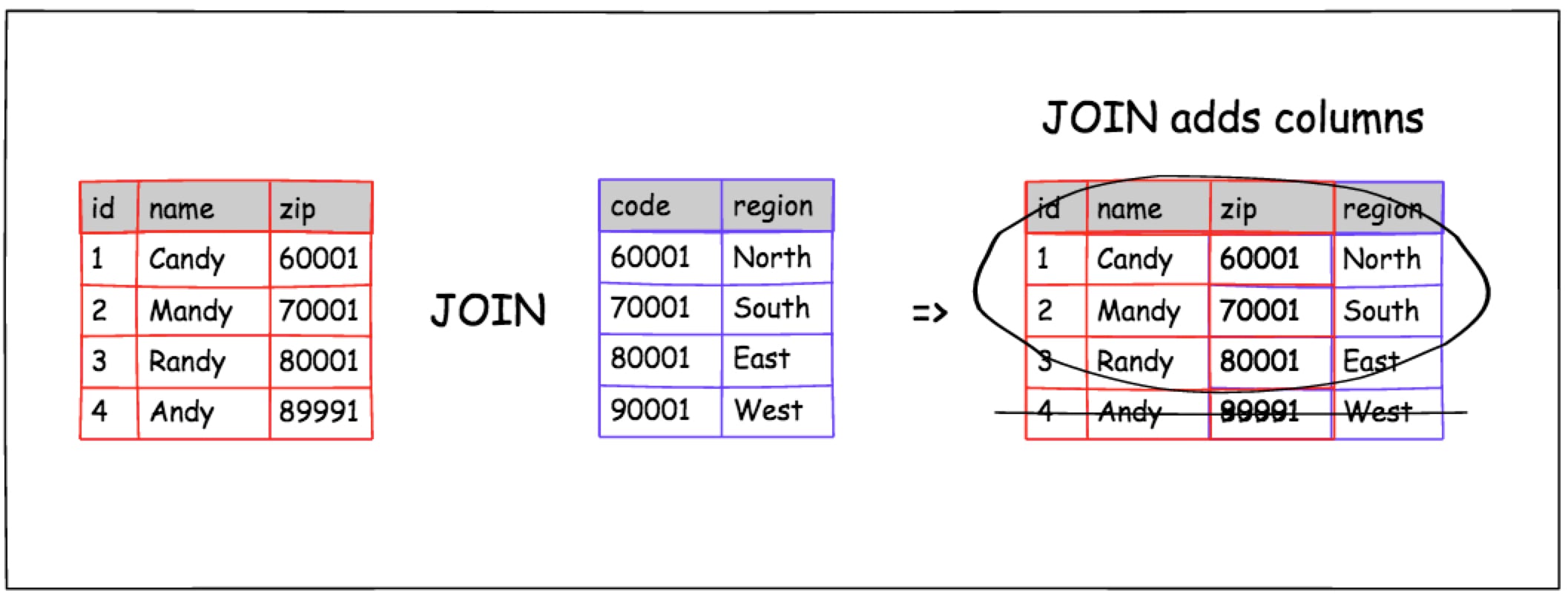
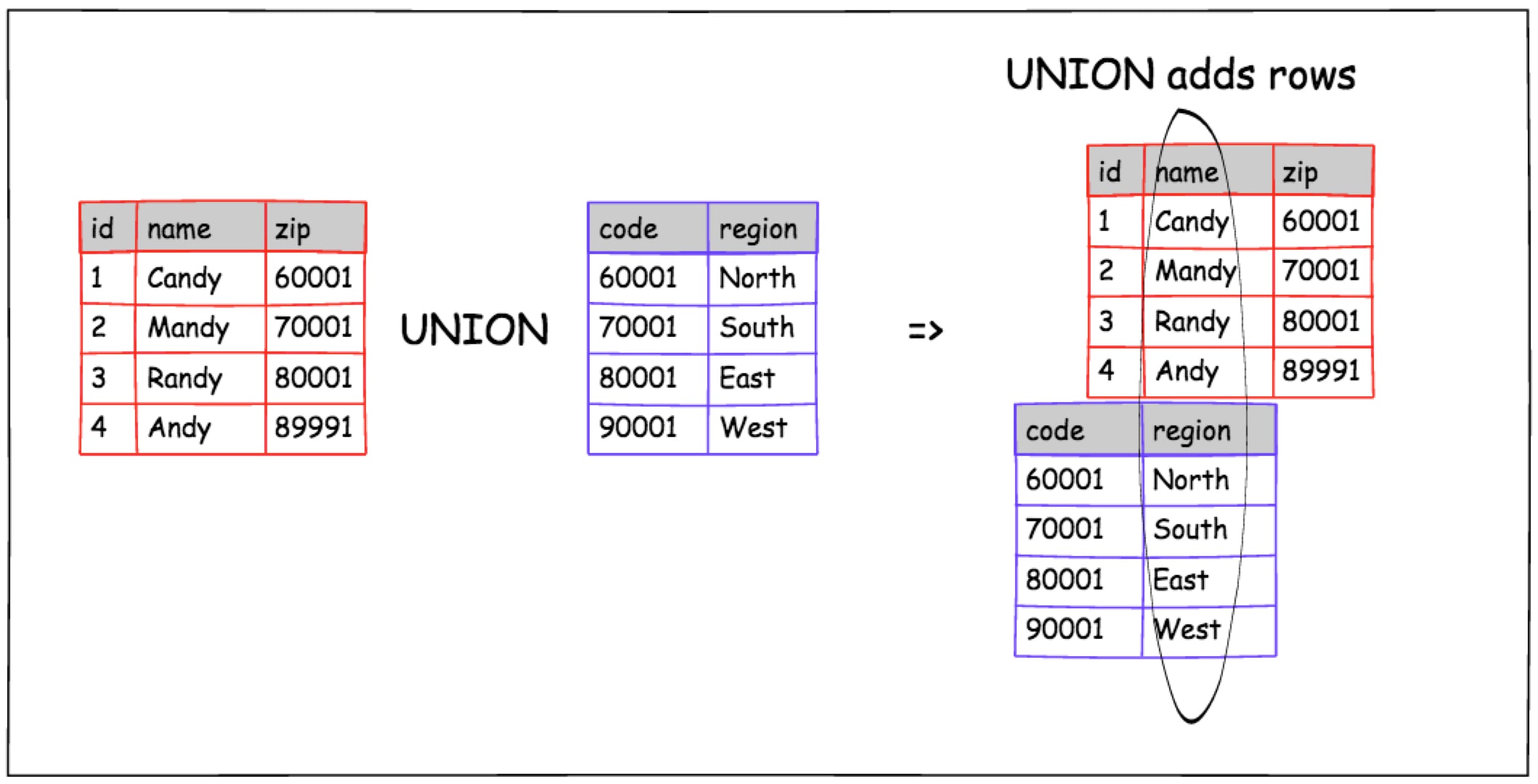
 JOIN and UNION are staples in SQL. In English they're synonyms to each other, but in SQL they behave very differently. They work in different directions.
**TL;DR** - Use `JOIN` to add columns. Use `UNION` to add rows.
According to Wikipedia a `JOIN` is:
> An SQL join clause combines columns from one or more tables in a relational database. It creates a set that can be saved as a table or used as it is. A JOIN is a means for combining columns from one (self-join) or more tables by using values common to each. ANSI-standard SQL specifies five types of JOIN: INNER, LEFT OUTER, RIGHT OUTER, FULL OUTER and CROSS. As a special case, a table (base table, view, or joined table) can JOIN to itself in a self-join.
>
> -- https://en.wikipedia.org/wiki/Join_(SQL)
And here's their definition for `UNION`:
> In SQL the UNION clause combines the results of two SQL queries into a single table of all matching rows. The two queries must result in the same number of columns and compatible data types in order to unite
>
> -- https://en.wikipedia.org/wiki/Set_operations_(SQL)#UNION_operator
!!! tip "Memory Tip"
`UNION` adds rows `UNder` the results.
`JOIN` has not tip, but it's not a `UNION`.
## Data Setup
We're going to use a 2 table database. People belong to a zip code and zip codes have a named region.
!!! success "Schema"
```sql
CREATE TABLE people AS
SELECT * FROM (
VALUES
(1, 'Candy', '60001'),
(2, 'Mandy', '70001'),
(3, 'Randy', '80001'),
(4, 'Andy', '89991')
) AS t (id, name, zip_code);
CREATE TABLE zip_codes AS
SELECT * FROM (
VALUES
('60001', 'North'),
('70001', 'South'),
('80001', 'East'),
('90001', 'West')
) AS t (code, region);
```
## JOIN Problems
The best time to use a `JOIN` is when we need to show a column from another table which correlates to a column from a previously declared table.
JOIN and UNION are staples in SQL. In English they're synonyms to each other, but in SQL they behave very differently. They work in different directions.
**TL;DR** - Use `JOIN` to add columns. Use `UNION` to add rows.
According to Wikipedia a `JOIN` is:
> An SQL join clause combines columns from one or more tables in a relational database. It creates a set that can be saved as a table or used as it is. A JOIN is a means for combining columns from one (self-join) or more tables by using values common to each. ANSI-standard SQL specifies five types of JOIN: INNER, LEFT OUTER, RIGHT OUTER, FULL OUTER and CROSS. As a special case, a table (base table, view, or joined table) can JOIN to itself in a self-join.
>
> -- https://en.wikipedia.org/wiki/Join_(SQL)
And here's their definition for `UNION`:
> In SQL the UNION clause combines the results of two SQL queries into a single table of all matching rows. The two queries must result in the same number of columns and compatible data types in order to unite
>
> -- https://en.wikipedia.org/wiki/Set_operations_(SQL)#UNION_operator
!!! tip "Memory Tip"
`UNION` adds rows `UNder` the results.
`JOIN` has not tip, but it's not a `UNION`.
## Data Setup
We're going to use a 2 table database. People belong to a zip code and zip codes have a named region.
!!! success "Schema"
```sql
CREATE TABLE people AS
SELECT * FROM (
VALUES
(1, 'Candy', '60001'),
(2, 'Mandy', '70001'),
(3, 'Randy', '80001'),
(4, 'Andy', '89991')
) AS t (id, name, zip_code);
CREATE TABLE zip_codes AS
SELECT * FROM (
VALUES
('60001', 'North'),
('70001', 'South'),
('80001', 'East'),
('90001', 'West')
) AS t (code, region);
```
## JOIN Problems
The best time to use a `JOIN` is when we need to show a column from another table which correlates to a column from a previously declared table.
 **Problem**:
The Sales Team would like a list of people's names with their regions.
Create a query with each person correlated to the zip code `region`?
!!! success "Solution"
```sql
SELECT
people.id,
people.name,
people.zip_code,
zip_codes.region
FROM people
JOIN zip_codes ON zip_codes.code = people.zip_code;
```
| id | name | zip_code | region
|----|-------|----------|--------
| 1 | Candy | 60001 | North
| 2 | Mandy | 70001 | South
| 3 | Randy | 80001 | East
**Problem**:
List all the people who belong to an unknown zip code?
!!! success "Solution"
```sql
SELECT
people.id,
people.name,
people.zip_code,
zip_codes.region
FROM people
LEFT JOIN zip_codes ON zip_codes.code = people.zip_code
WHERE zip_codes.code IS NULL;
```
id | name | zip_code | region
-- | ---- | -------- | ------
4 | Andy | 89991 |
### JOIN Notes
- `INNER JOIN` and `JOIN` are interpreted identically. The later saves typing 6 characters.
- `INNER JOIN` is great for finding correlation, but bad for finding unmatched records.
- `LEFT JOIN` tells the query engine we want to return all data on the `LEFT` or earlier tables even though the correlated value doesn't exist.
- `RIGHT JOIN` is the opposite of `LEFT`. They retain rows from tables mentioned later in the query.
- Mixing `LEFT JOIN` with `RIGHT JOIN` in the same query should be avoided.
- The `WHERE` condition states we only want the uncorrelated rows, the `people` missing a `zip_codes` record.
## UNION Problems
The `UNION` clause allows us to conform 2 or more unrelated results into a single uniform results.
**Problem**:
The Sales Team would like a list of people's names with their regions.
Create a query with each person correlated to the zip code `region`?
!!! success "Solution"
```sql
SELECT
people.id,
people.name,
people.zip_code,
zip_codes.region
FROM people
JOIN zip_codes ON zip_codes.code = people.zip_code;
```
| id | name | zip_code | region
|----|-------|----------|--------
| 1 | Candy | 60001 | North
| 2 | Mandy | 70001 | South
| 3 | Randy | 80001 | East
**Problem**:
List all the people who belong to an unknown zip code?
!!! success "Solution"
```sql
SELECT
people.id,
people.name,
people.zip_code,
zip_codes.region
FROM people
LEFT JOIN zip_codes ON zip_codes.code = people.zip_code
WHERE zip_codes.code IS NULL;
```
id | name | zip_code | region
-- | ---- | -------- | ------
4 | Andy | 89991 |
### JOIN Notes
- `INNER JOIN` and `JOIN` are interpreted identically. The later saves typing 6 characters.
- `INNER JOIN` is great for finding correlation, but bad for finding unmatched records.
- `LEFT JOIN` tells the query engine we want to return all data on the `LEFT` or earlier tables even though the correlated value doesn't exist.
- `RIGHT JOIN` is the opposite of `LEFT`. They retain rows from tables mentioned later in the query.
- Mixing `LEFT JOIN` with `RIGHT JOIN` in the same query should be avoided.
- The `WHERE` condition states we only want the uncorrelated rows, the `people` missing a `zip_codes` record.
## UNION Problems
The `UNION` clause allows us to conform 2 or more unrelated results into a single uniform results.
 **Problem**
The search department wants a list of all keywords for their search index.
Return a list of keywords from both the people and the zip code tables.
!!! success "Solution"
```sql
SELECT
name AS keyword
FROM people
UNION
SELECT
region
FROM zip_codes;
```
| keyword |
| --------- |
| East |
| North |
| South |
| Mandy |
| Candy |
| Randy |
| Andy |
| West |
**Problem**
The search department likes the results, but wants to be able to correlate the row back to its source table and row.
!!! success "Solution"
```sql
SELECT
'people' AS source,
id::varchar AS key,
name AS keyword
FROM people
UNION
SELECT
'zip_codes',
code,
region
FROM zip_codes
ORDER BY 1, 2, 3;
```
source | key | keyword
-----------|-------|---------
people | 1 | Candy
people | 2 | Mandy
people | 3 | Randy
people | 4 | Andy
zip_codes | 60001 | North
zip_codes | 70001 | South
zip_codes | 80001 | East
zip_codes | 90001 | West
### UNION Notes
- The `UNION` clause requires all the columns from its sub queries to be the same number and type. This is why `::varchar` casting was added.
- `UNION` defaults to only returning distinct rows between the result sets. If you want all rows regardless of duplicates try `UNION ALL`.
- `ORDER BY` with `UNION` works on the final results. When ordering is needed within a sub query use parenthesis. Ex: `UNION (SELECT ... ORDER BY ... LIMIT 1)`
## Bonus Problem
Return the people with invalid zip codes __without__ using `JOIN`.
Hints:
- `EXCEPT` is the inverse of a `UNION`. `EXCEPT` removes the results from the source query instead of appending them.
- `IN` can be used as a matching clause in a `WHERE` filter.
!!! success "Solution"
```sql
SELECT
people.*
FROM people
WHERE zip_code IN (
SELECT
zip_code
FROM people
EXCEPT
SELECT
code
FROM zip_codes
);
```
id | name | zip_code
----|------|----------
4 | Andy | 89991
## Closing
!!! success "Clean Up"
```sql
DROP TABLE people;
DROP TABLE zip_codes;
```
`JOIN` and `UNION` are an essential part of a SQL users tool belt. On a day to day basis, `JOIN` is used more often than `UNION`, so we would recommend understanding it first. `UNION` gets it power when we realize our data is more alike than originally intended. Both clauses should be withheld at dinner parties and other social events.
Happy SQL-ing!
**Problem**
The search department wants a list of all keywords for their search index.
Return a list of keywords from both the people and the zip code tables.
!!! success "Solution"
```sql
SELECT
name AS keyword
FROM people
UNION
SELECT
region
FROM zip_codes;
```
| keyword |
| --------- |
| East |
| North |
| South |
| Mandy |
| Candy |
| Randy |
| Andy |
| West |
**Problem**
The search department likes the results, but wants to be able to correlate the row back to its source table and row.
!!! success "Solution"
```sql
SELECT
'people' AS source,
id::varchar AS key,
name AS keyword
FROM people
UNION
SELECT
'zip_codes',
code,
region
FROM zip_codes
ORDER BY 1, 2, 3;
```
source | key | keyword
-----------|-------|---------
people | 1 | Candy
people | 2 | Mandy
people | 3 | Randy
people | 4 | Andy
zip_codes | 60001 | North
zip_codes | 70001 | South
zip_codes | 80001 | East
zip_codes | 90001 | West
### UNION Notes
- The `UNION` clause requires all the columns from its sub queries to be the same number and type. This is why `::varchar` casting was added.
- `UNION` defaults to only returning distinct rows between the result sets. If you want all rows regardless of duplicates try `UNION ALL`.
- `ORDER BY` with `UNION` works on the final results. When ordering is needed within a sub query use parenthesis. Ex: `UNION (SELECT ... ORDER BY ... LIMIT 1)`
## Bonus Problem
Return the people with invalid zip codes __without__ using `JOIN`.
Hints:
- `EXCEPT` is the inverse of a `UNION`. `EXCEPT` removes the results from the source query instead of appending them.
- `IN` can be used as a matching clause in a `WHERE` filter.
!!! success "Solution"
```sql
SELECT
people.*
FROM people
WHERE zip_code IN (
SELECT
zip_code
FROM people
EXCEPT
SELECT
code
FROM zip_codes
);
```
id | name | zip_code
----|------|----------
4 | Andy | 89991
## Closing
!!! success "Clean Up"
```sql
DROP TABLE people;
DROP TABLE zip_codes;
```
`JOIN` and `UNION` are an essential part of a SQL users tool belt. On a day to day basis, `JOIN` is used more often than `UNION`, so we would recommend understanding it first. `UNION` gets it power when we realize our data is more alike than originally intended. Both clauses should be withheld at dinner parties and other social events.
Happy SQL-ing!
