---
title: "Dev Blog Tools :: A Quick Tour of My Setup"
date: 2018-03-22
created: 2018-03-22T00:00:00Z
type: blog
status: settled
publish: [ddrscott]
source: import
description: "Tools I use to create posts, screenshots, code snippets, gifs, screencasts, and other interesting things."
image: /images/my_blog_setup.png
prompt: "Import from blog post: 2018/blog-setup.markdown"
---
# Dev Blog Tools :: A Quick Tour of My Setup
I've been asked to share about my blogging setup a few times, so in the spirit of keeping things [DRY][], it's time to make a post about it.
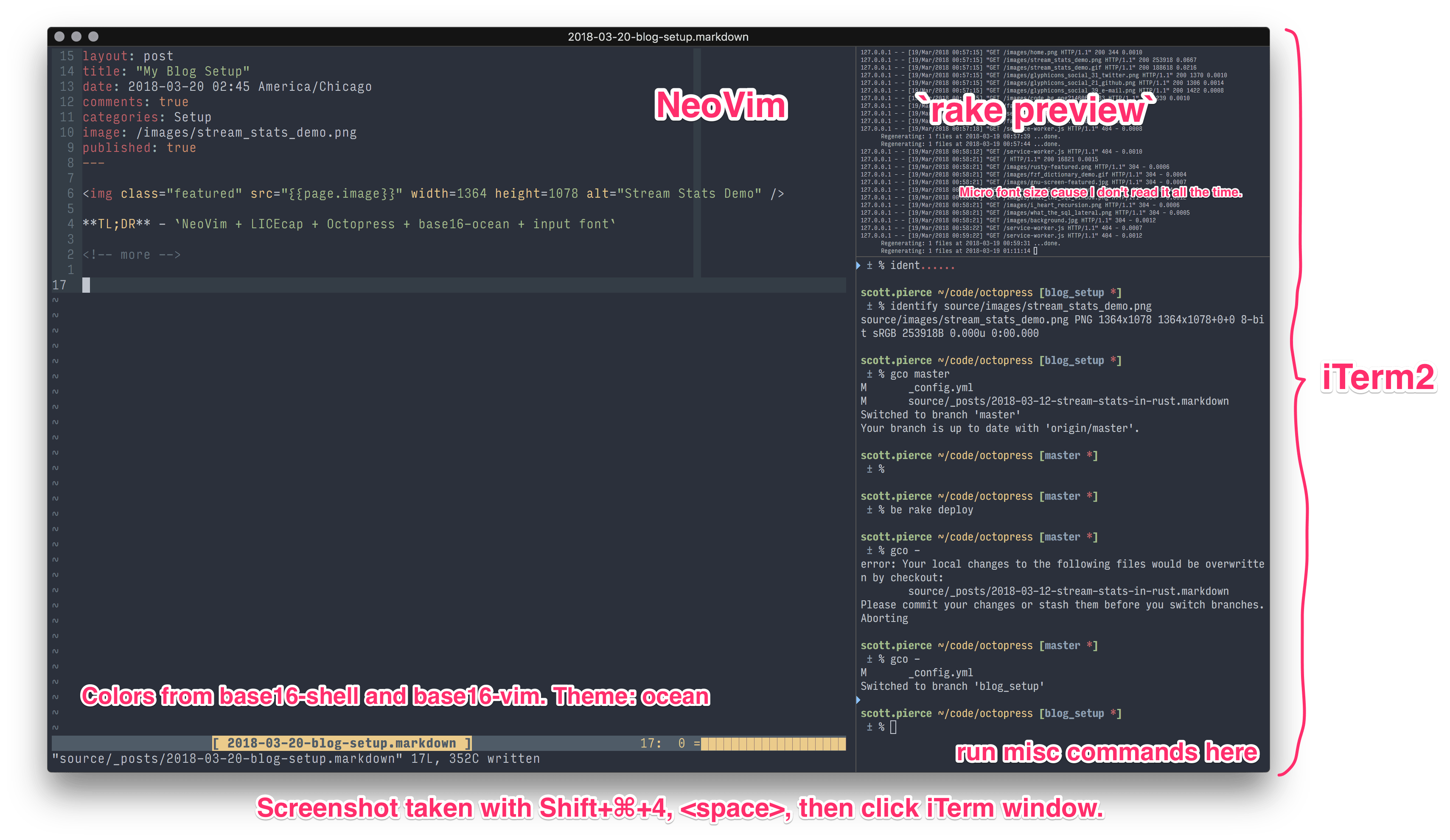
**TL;DR** -- Mac, iTerm, NeoVim, LICEcap, Octopress, Base16, Input Font, Skitch, OBS
> **WARNING** This is an atypical post. I normally prefer to go over a single feature, but this time I'm going to under explain a lot of features. Here's a short list of typical posts in case chaos is not your thing:
>
> + https://ddrscott.github.io/blog/2017/vim-send-text/
> + https://ddrscott.github.io/blog/2017/what-the-sql-lateral/
> + https://ddrscott.github.io/blog/2016/negative-modulo/
## Computer
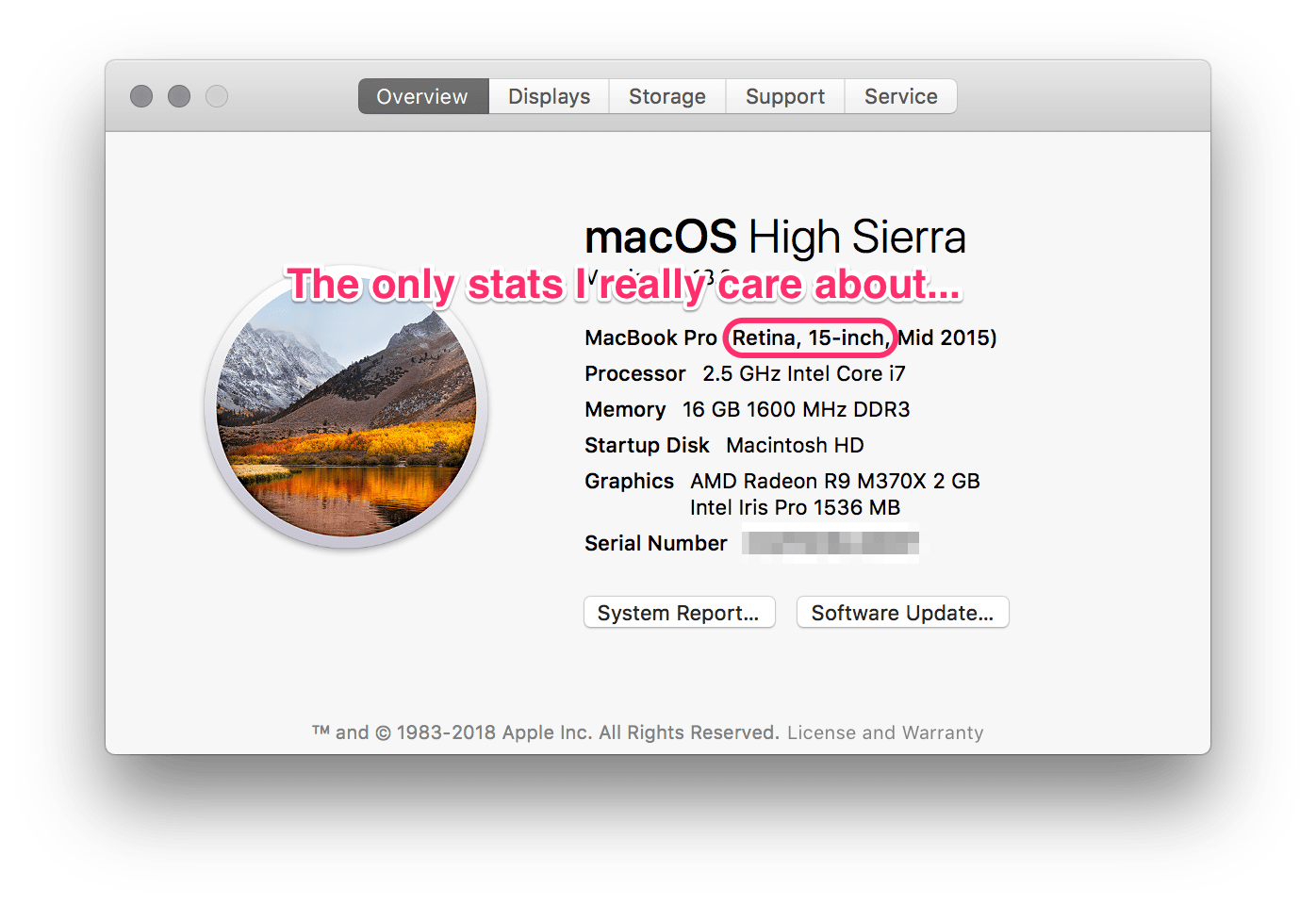
I do all my writing and coding on a MacBook Pro Retina 15 inch. It's pretty maxed out, but I don't think it needs to be that way. The only stats I really care about are the size and the clarity of the screen.
## Terminal
I like to live in a terminal. I choose [iTerm2][] for it's split panes and independent font size per pane. At times I wish it was as fast as the native Terminal.app, but it doesn't support splits. I've been told many times that [tmux][] supports splits, too, but I can't change the text size independently between splits. I'd also rather use [GNU screen][screen] anyway.
> Old timers like old things™
## Editor
[NeoVim][] is always loaded in one of my terminal panes. It's the most efficient editor for me. I switched away from Vim 7 because it couldn't do background jobs. Prior to Vim I used [RubyMine][] and [IntelliJ][] which were great for code completion and navigating projects, but felt heavy for notes, free form writing, and editing system files. I'll save the rest of the Vim sermon for another post.
When composing posts, I use [vim-markdown][] to get syntax highlighting, folding, TOC, and other goodies.
My entire NeoVim config can be found in its [Github repository][config-nvim]. I don't recommend folks using it outright, but borrow parts if it and slowly integrate it into their own setup. One size doesn't fit all. It barely fits me!
## Colors
I lived in [Solarized Dark](http://ethanschoonover.com/solarized) for many years. It is so common place in development shops it became the [new green screen][] of the 70's and 80's. So when folks see yellow and green highlights against an off-black chalkboard beaming from my terminal, there's pause and self reflection. They wonder how they were nestled into a monotonous monoculture. They ponder when they traded emotional delight for ocular comfort. They realize depression encroached silently on them like mold in a damp attic. But I digress…
Here's how Base16 describes itself:
> An architecture for building themes based on carefully chosen syntax highlighting using a base of sixteen colours. Base16 provides a set of guidelines detailing how to style syntax and how to code a builder for compiling base16 schemes and templates.
>
> -- https://github.com/chriskempson/base16
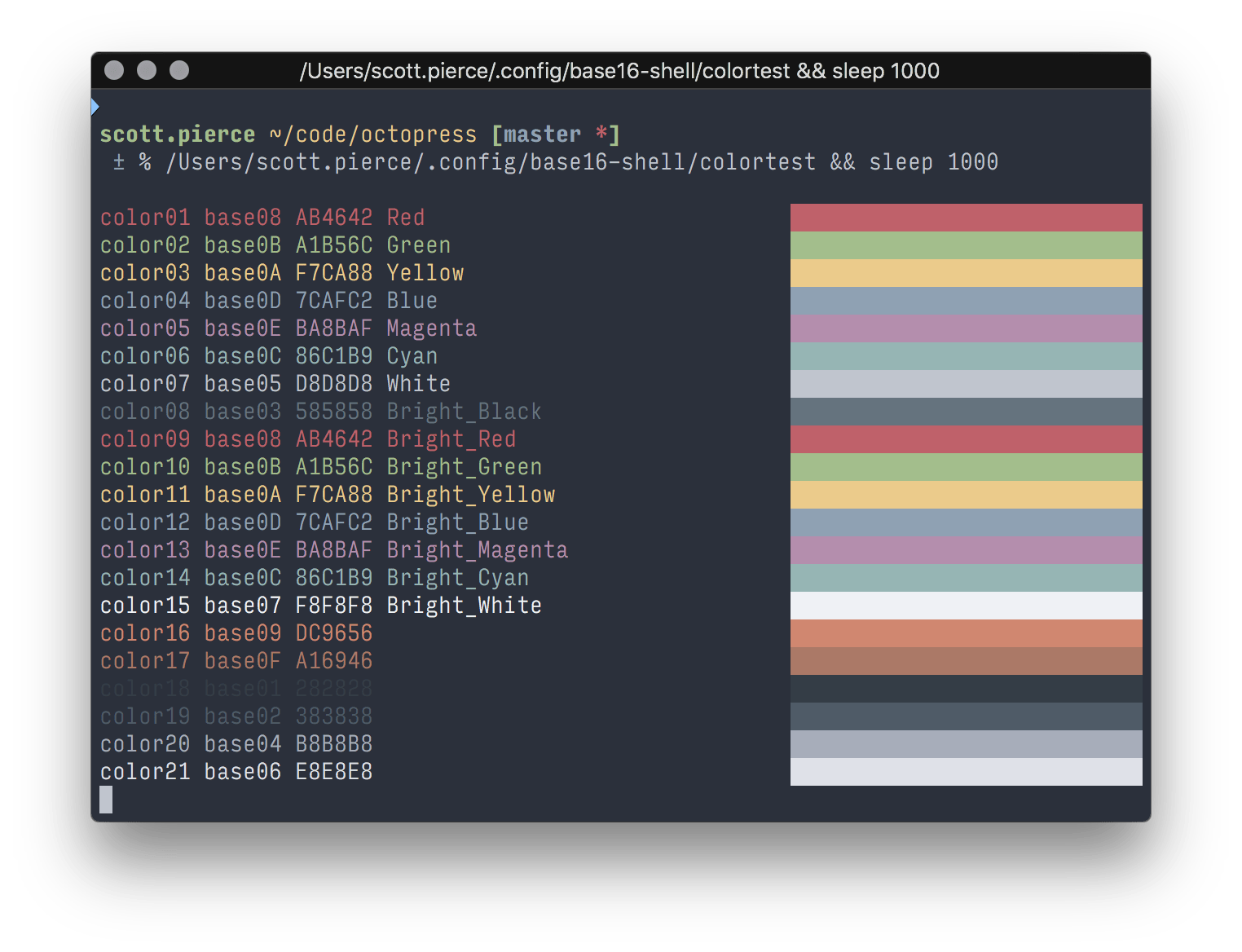
[base16-ocean][] is the color scheme I use. It's scheme #74, type `j` or `k` to change the theme). The scheme is perfectly in sync between shell and Vim due to [base16-shell][] and [base16-vim][]. I wrote a [longer post about using Base16 while back](/blog/2017/base16-shell/).
## Font
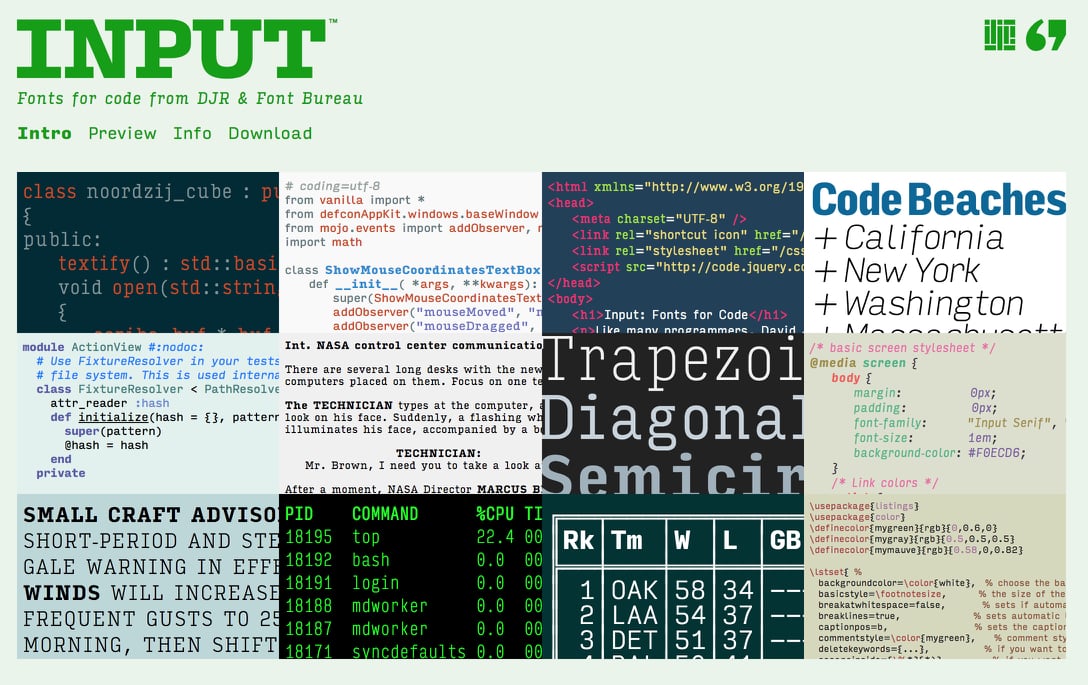
I've been using the same code font for as long as I can remember: Input Mono Condensed.
> Input is a flexible system of fonts designed specifically for code by David Jonathan Ross. It offers both monospaced and proportional fonts, all with a large range of widths, weights, and styles for richer code formatting.
>
> -- Font Bureau
I enjoy the fancy 'a' and 'g' characters along with easy to distinguish 'l', '1', and 'I'.(Helvetica can't do it justice.) It also has several different character width options so I can squeeze more code into one eye shot.
Speaking of shots…
## Screenshots
I have a few ways of taking screenshots and it's mainly the Mac way:
+ To snap a small portion of the screen, I use `⇧+⌘+4`, then select region to snap.
+ To snap a window with the shadow, I use `⇧+⌘+4`, then `space` and select a window.
[Apple's support page][apple1] has the gruesome details on both.
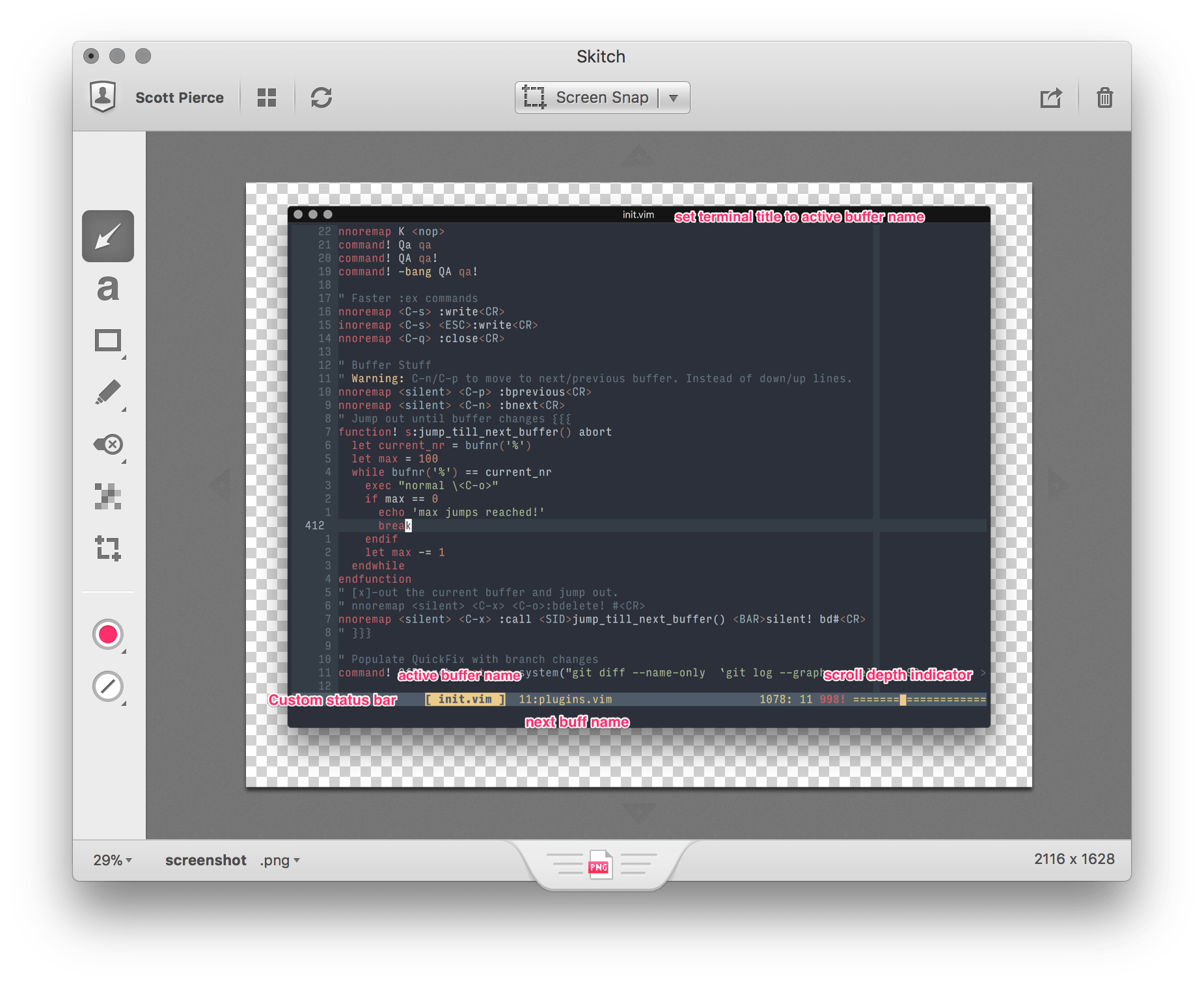
When I want to annotate a screenshot, I use [Evernote's Skitch App][skitch]. The featured image was created using a combination of OSX screenshot and then editing in [Skitch][skitch].
## Animated Gifs and Videos
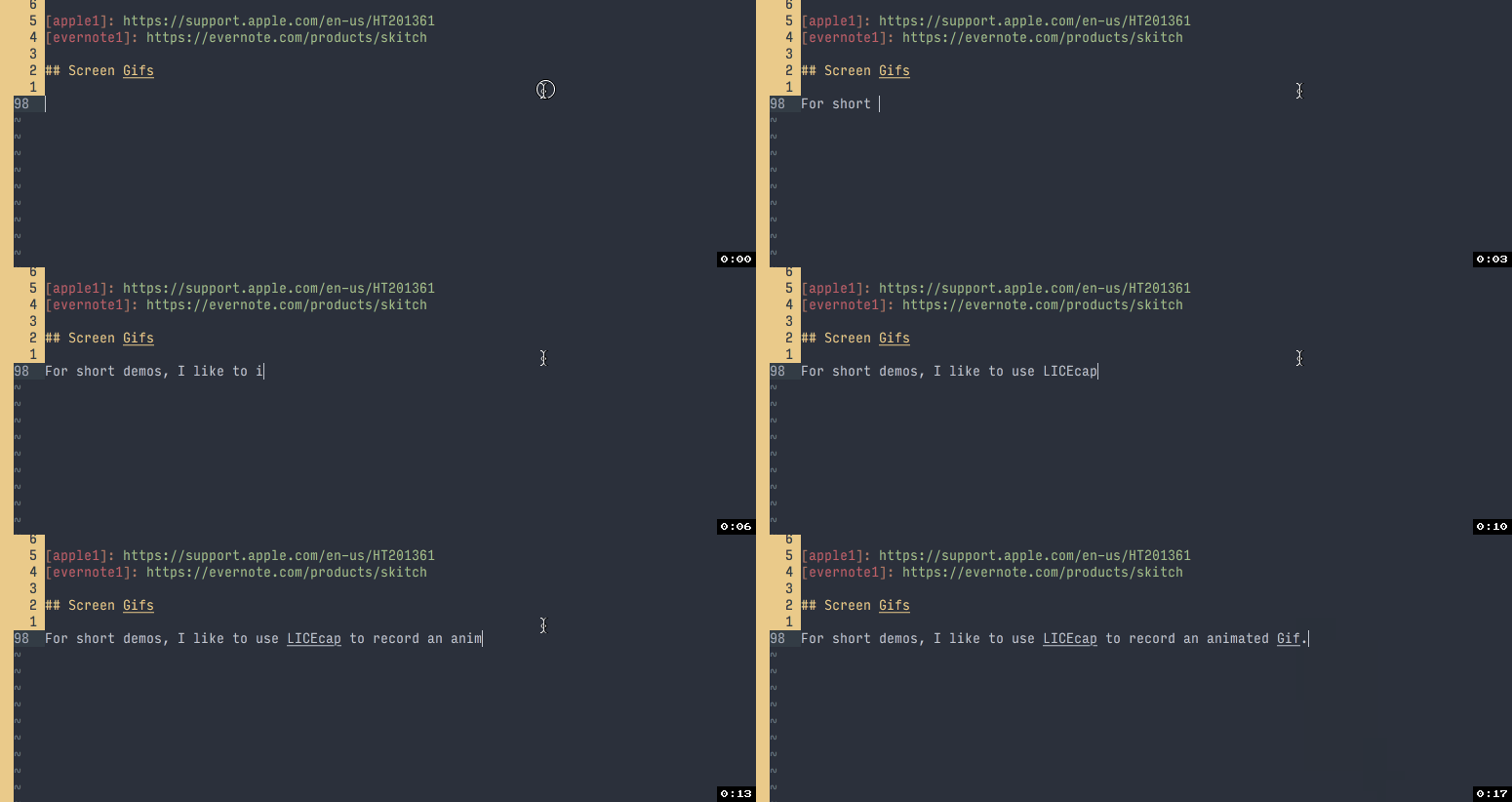
For short demos, I like to use [LICEcap][] to record an animated Gif. I wouldn't use Gifs for anything longer than a few seconds since it doesn't support video playback controls without extra magic.
Here's an example [LICEcap][] Gif:
And here's a video of how I produced it:
For full screen video record, I use [OBS Studio][obs]. (You might have noticed me stopping the recording at the end of the video. Should have used a hotkey.) It produces small file sizes and has a lot of features including webcam overlays, filters, transforms, etc. It deserves a whole book of its own.
> **Note to Self**
>
> 1. write book about OBS Studio
> 2. retire
## Blog Generator
I use [Octopress][octopress1] to generate the static HTML pages you're reading now. I haven't updated it since 2014 ([SHA 71e4d40b][octopress2]) and I'm terrified to do so. The setup Just Works™. I write in [Markdown][] and it does the rest.
The source code for this exact post is [here](https://github.com/ddrscott/octopress/blob/master/source/_posts/2018-03-22-blog-setup.markdown).
That being said, I'm strongly considering switching to [Mkdocs][] to have more structure and better search capabilities built-in.
## Closing
You made it to the end! I hope at least one of these will benefit your daily computing life.
Questions? Comments? Trolls?!? Let me know! Tweet
[Hacker News](https://news.ycombinator.com/item?id=16648381)
**Links**
+ iTerm2 -- https://www.iterm2.com/
+ Tmux -- https://github.com/tmux/tmux/wiki
+ GNU Screen -- https://www.gnu.org/software/screen/
+ RubyMine -- https://www.jetbrains.com/ruby/
+ IntelliJ -- https://www.jetbrains.com/idea/
+ Vim -- https://www.vim.org
+ NeoVim -- https://neovim.io/
+ vim-markdown -- https://github.com/plasticboy/vim-markdown
+ My NeoVim Config -- https://github.com/ddrscott/config-nvim
+ base16-shell -- https://github.com/chriskempson/base16-shell
+ base16-vim -- https://github.com/chriskempson/base16-vim
+ base16-ocean -- http://chriskempson.com/projects/base16/
+ Input Font -- http://input.fontbureau.com/
+ Skitch -- https://evernote.com/products/skitch
+ LICEcap -- https://www.cockos.com/licecap/
+ OBS Studio -- https://obsproject.com/
+ Octopress -- http://octopress.org/
+ Mkdocs -- http://www.mkdocs.org/
**Edits**
+ added Hacker News link
[DRY]: https://en.wikipedia.org/wiki/Don%27t_repeat_yourself
[iTerm2]: https://www.iterm2.com/
[tmux]: https://github.com/tmux/tmux/wiki
[screen]: https://www.gnu.org/software/screen/
[rubymine]: https://www.jetbrains.com/ruby/
[intellij]: https://www.jetbrains.com/idea/
[vim]: https://www.vim.org
[NeoVim]: https://neovim.io/
[vim-markdown]: https://github.com/plasticboy/vim-markdown
[config-nvim]: https://github.com/ddrscott/config-nvim
[new green screen]: https://en.wikipedia.org/wiki/Monochrome_monitor#/media/File:IBM_PC_5150.jpg
[base16-shell]: https://github.com/chriskempson/base16-shell
[base16-vim]: https://github.com/chriskempson/base16-vim
[base16-ocean]: http://chriskempson.com/projects/base16/
[input_font]: http://input.fontbureau.com/
[apple1]: https://support.apple.com/en-us/HT201361
[skitch]: https://evernote.com/products/skitch
[licecap]: https://www.cockos.com/licecap/
[obs]: https://obsproject.com/
[octopress1]: http://octopress.org/
[octopress2]: https://github.com/imathis/octopress/tree/71e4d40ba7aef73da65936bc9a77e432609811b2
[mkdocs]: http://www.mkdocs.org/
[markdown]: https://en.wikipedia.org/wiki/Markdown
 I've been asked to share about my blogging setup a few times, so in the spirit of keeping things [DRY][], it's time to make a post about it.
**TL;DR** -- Mac, iTerm, NeoVim, LICEcap, Octopress, Base16, Input Font, Skitch, OBS
> **WARNING** This is an atypical post. I normally prefer to go over a single feature, but this time I'm going to under explain a lot of features. Here's a short list of typical posts in case chaos is not your thing:
>
> + https://ddrscott.github.io/blog/2017/vim-send-text/
> + https://ddrscott.github.io/blog/2017/what-the-sql-lateral/
> + https://ddrscott.github.io/blog/2016/negative-modulo/
## Computer
I do all my writing and coding on a MacBook Pro Retina 15 inch. It's pretty maxed out, but I don't think it needs to be that way. The only stats I really care about are the size and the clarity of the screen.
I've been asked to share about my blogging setup a few times, so in the spirit of keeping things [DRY][], it's time to make a post about it.
**TL;DR** -- Mac, iTerm, NeoVim, LICEcap, Octopress, Base16, Input Font, Skitch, OBS
> **WARNING** This is an atypical post. I normally prefer to go over a single feature, but this time I'm going to under explain a lot of features. Here's a short list of typical posts in case chaos is not your thing:
>
> + https://ddrscott.github.io/blog/2017/vim-send-text/
> + https://ddrscott.github.io/blog/2017/what-the-sql-lateral/
> + https://ddrscott.github.io/blog/2016/negative-modulo/
## Computer
I do all my writing and coding on a MacBook Pro Retina 15 inch. It's pretty maxed out, but I don't think it needs to be that way. The only stats I really care about are the size and the clarity of the screen.
 ## Terminal
I like to live in a terminal. I choose [iTerm2][] for it's split panes and independent font size per pane. At times I wish it was as fast as the native Terminal.app, but it doesn't support splits. I've been told many times that [tmux][] supports splits, too, but I can't change the text size independently between splits. I'd also rather use [GNU screen][screen] anyway.
> Old timers like old things™
## Editor
[NeoVim][] is always loaded in one of my terminal panes. It's the most efficient editor for me. I switched away from Vim 7 because it couldn't do background jobs. Prior to Vim I used [RubyMine][] and [IntelliJ][] which were great for code completion and navigating projects, but felt heavy for notes, free form writing, and editing system files. I'll save the rest of the Vim sermon for another post.
When composing posts, I use [vim-markdown][] to get syntax highlighting, folding, TOC, and other goodies.
My entire NeoVim config can be found in its [Github repository][config-nvim]. I don't recommend folks using it outright, but borrow parts if it and slowly integrate it into their own setup. One size doesn't fit all. It barely fits me!
## Colors
I lived in [Solarized Dark](http://ethanschoonover.com/solarized) for many years. It is so common place in development shops it became the [new green screen][] of the 70's and 80's. So when folks see yellow and green highlights against an off-black chalkboard beaming from my terminal, there's pause and self reflection. They wonder how they were nestled into a monotonous monoculture. They ponder when they traded emotional delight for ocular comfort. They realize depression encroached silently on them like mold in a damp attic. But I digress…
Here's how Base16 describes itself:
> An architecture for building themes based on carefully chosen syntax highlighting using a base of sixteen colours. Base16 provides a set of guidelines detailing how to style syntax and how to code a builder for compiling base16 schemes and templates.
>
> -- https://github.com/chriskempson/base16
## Terminal
I like to live in a terminal. I choose [iTerm2][] for it's split panes and independent font size per pane. At times I wish it was as fast as the native Terminal.app, but it doesn't support splits. I've been told many times that [tmux][] supports splits, too, but I can't change the text size independently between splits. I'd also rather use [GNU screen][screen] anyway.
> Old timers like old things™
## Editor
[NeoVim][] is always loaded in one of my terminal panes. It's the most efficient editor for me. I switched away from Vim 7 because it couldn't do background jobs. Prior to Vim I used [RubyMine][] and [IntelliJ][] which were great for code completion and navigating projects, but felt heavy for notes, free form writing, and editing system files. I'll save the rest of the Vim sermon for another post.
When composing posts, I use [vim-markdown][] to get syntax highlighting, folding, TOC, and other goodies.
My entire NeoVim config can be found in its [Github repository][config-nvim]. I don't recommend folks using it outright, but borrow parts if it and slowly integrate it into their own setup. One size doesn't fit all. It barely fits me!
## Colors
I lived in [Solarized Dark](http://ethanschoonover.com/solarized) for many years. It is so common place in development shops it became the [new green screen][] of the 70's and 80's. So when folks see yellow and green highlights against an off-black chalkboard beaming from my terminal, there's pause and self reflection. They wonder how they were nestled into a monotonous monoculture. They ponder when they traded emotional delight for ocular comfort. They realize depression encroached silently on them like mold in a damp attic. But I digress…
Here's how Base16 describes itself:
> An architecture for building themes based on carefully chosen syntax highlighting using a base of sixteen colours. Base16 provides a set of guidelines detailing how to style syntax and how to code a builder for compiling base16 schemes and templates.
>
> -- https://github.com/chriskempson/base16
 [base16-ocean][] is the color scheme I use. It's scheme #74, type `j` or `k` to change the theme). The scheme is perfectly in sync between shell and Vim due to [base16-shell][] and [base16-vim][]. I wrote a [longer post about using Base16 while back](/blog/2017/base16-shell/).
## Font
I've been using the same code font for as long as I can remember: Input Mono Condensed.
[base16-ocean][] is the color scheme I use. It's scheme #74, type `j` or `k` to change the theme). The scheme is perfectly in sync between shell and Vim due to [base16-shell][] and [base16-vim][]. I wrote a [longer post about using Base16 while back](/blog/2017/base16-shell/).
## Font
I've been using the same code font for as long as I can remember: Input Mono Condensed.
 > Input is a flexible system of fonts designed specifically for code by David Jonathan Ross. It offers both monospaced and proportional fonts, all with a large range of widths, weights, and styles for richer code formatting.
>
> -- Font Bureau
I enjoy the fancy 'a' and 'g' characters along with easy to distinguish 'l', '1', and 'I'.(Helvetica can't do it justice.) It also has several different character width options so I can squeeze more code into one eye shot.
> Input is a flexible system of fonts designed specifically for code by David Jonathan Ross. It offers both monospaced and proportional fonts, all with a large range of widths, weights, and styles for richer code formatting.
>
> -- Font Bureau
I enjoy the fancy 'a' and 'g' characters along with easy to distinguish 'l', '1', and 'I'.(Helvetica can't do it justice.) It also has several different character width options so I can squeeze more code into one eye shot.
 Speaking of shots…
## Screenshots
I have a few ways of taking screenshots and it's mainly the Mac way:
+ To snap a small portion of the screen, I use `⇧+⌘+4`, then select region to snap.
+ To snap a window with the shadow, I use `⇧+⌘+4`, then `space` and select a window.
[Apple's support page][apple1] has the gruesome details on both.
When I want to annotate a screenshot, I use [Evernote's Skitch App][skitch]. The featured image was created using a combination of OSX screenshot and then editing in [Skitch][skitch].
Speaking of shots…
## Screenshots
I have a few ways of taking screenshots and it's mainly the Mac way:
+ To snap a small portion of the screen, I use `⇧+⌘+4`, then select region to snap.
+ To snap a window with the shadow, I use `⇧+⌘+4`, then `space` and select a window.
[Apple's support page][apple1] has the gruesome details on both.
When I want to annotate a screenshot, I use [Evernote's Skitch App][skitch]. The featured image was created using a combination of OSX screenshot and then editing in [Skitch][skitch].
 ## Animated Gifs and Videos
For short demos, I like to use [LICEcap][] to record an animated Gif. I wouldn't use Gifs for anything longer than a few seconds since it doesn't support video playback controls without extra magic.
Here's an example [LICEcap][] Gif:
## Animated Gifs and Videos
For short demos, I like to use [LICEcap][] to record an animated Gif. I wouldn't use Gifs for anything longer than a few seconds since it doesn't support video playback controls without extra magic.
Here's an example [LICEcap][] Gif:
 And here's a video of how I produced it:
For full screen video record, I use [OBS Studio][obs]. (You might have noticed me stopping the recording at the end of the video. Should have used a hotkey.) It produces small file sizes and has a lot of features including webcam overlays, filters, transforms, etc. It deserves a whole book of its own.
> **Note to Self**
>
> 1. write book about OBS Studio
> 2. retire
## Blog Generator
I use [Octopress][octopress1] to generate the static HTML pages you're reading now. I haven't updated it since 2014 ([SHA 71e4d40b][octopress2]) and I'm terrified to do so. The setup Just Works™. I write in [Markdown][] and it does the rest.
The source code for this exact post is [here](https://github.com/ddrscott/octopress/blob/master/source/_posts/2018-03-22-blog-setup.markdown).
That being said, I'm strongly considering switching to [Mkdocs][] to have more structure and better search capabilities built-in.
## Closing
You made it to the end! I hope at least one of these will benefit your daily computing life.
Questions? Comments? Trolls?!? Let me know! Tweet
[Hacker News](https://news.ycombinator.com/item?id=16648381)
**Links**
+ iTerm2 -- https://www.iterm2.com/
+ Tmux -- https://github.com/tmux/tmux/wiki
+ GNU Screen -- https://www.gnu.org/software/screen/
+ RubyMine -- https://www.jetbrains.com/ruby/
+ IntelliJ -- https://www.jetbrains.com/idea/
+ Vim -- https://www.vim.org
+ NeoVim -- https://neovim.io/
+ vim-markdown -- https://github.com/plasticboy/vim-markdown
+ My NeoVim Config -- https://github.com/ddrscott/config-nvim
+ base16-shell -- https://github.com/chriskempson/base16-shell
+ base16-vim -- https://github.com/chriskempson/base16-vim
+ base16-ocean -- http://chriskempson.com/projects/base16/
+ Input Font -- http://input.fontbureau.com/
+ Skitch -- https://evernote.com/products/skitch
+ LICEcap -- https://www.cockos.com/licecap/
+ OBS Studio -- https://obsproject.com/
+ Octopress -- http://octopress.org/
+ Mkdocs -- http://www.mkdocs.org/
**Edits**
+ added Hacker News link
[DRY]: https://en.wikipedia.org/wiki/Don%27t_repeat_yourself
[iTerm2]: https://www.iterm2.com/
[tmux]: https://github.com/tmux/tmux/wiki
[screen]: https://www.gnu.org/software/screen/
[rubymine]: https://www.jetbrains.com/ruby/
[intellij]: https://www.jetbrains.com/idea/
[vim]: https://www.vim.org
[NeoVim]: https://neovim.io/
[vim-markdown]: https://github.com/plasticboy/vim-markdown
[config-nvim]: https://github.com/ddrscott/config-nvim
[new green screen]: https://en.wikipedia.org/wiki/Monochrome_monitor#/media/File:IBM_PC_5150.jpg
[base16-shell]: https://github.com/chriskempson/base16-shell
[base16-vim]: https://github.com/chriskempson/base16-vim
[base16-ocean]: http://chriskempson.com/projects/base16/
[input_font]: http://input.fontbureau.com/
[apple1]: https://support.apple.com/en-us/HT201361
[skitch]: https://evernote.com/products/skitch
[licecap]: https://www.cockos.com/licecap/
[obs]: https://obsproject.com/
[octopress1]: http://octopress.org/
[octopress2]: https://github.com/imathis/octopress/tree/71e4d40ba7aef73da65936bc9a77e432609811b2
[mkdocs]: http://www.mkdocs.org/
[markdown]: https://en.wikipedia.org/wiki/Markdown
And here's a video of how I produced it:
For full screen video record, I use [OBS Studio][obs]. (You might have noticed me stopping the recording at the end of the video. Should have used a hotkey.) It produces small file sizes and has a lot of features including webcam overlays, filters, transforms, etc. It deserves a whole book of its own.
> **Note to Self**
>
> 1. write book about OBS Studio
> 2. retire
## Blog Generator
I use [Octopress][octopress1] to generate the static HTML pages you're reading now. I haven't updated it since 2014 ([SHA 71e4d40b][octopress2]) and I'm terrified to do so. The setup Just Works™. I write in [Markdown][] and it does the rest.
The source code for this exact post is [here](https://github.com/ddrscott/octopress/blob/master/source/_posts/2018-03-22-blog-setup.markdown).
That being said, I'm strongly considering switching to [Mkdocs][] to have more structure and better search capabilities built-in.
## Closing
You made it to the end! I hope at least one of these will benefit your daily computing life.
Questions? Comments? Trolls?!? Let me know! Tweet
[Hacker News](https://news.ycombinator.com/item?id=16648381)
**Links**
+ iTerm2 -- https://www.iterm2.com/
+ Tmux -- https://github.com/tmux/tmux/wiki
+ GNU Screen -- https://www.gnu.org/software/screen/
+ RubyMine -- https://www.jetbrains.com/ruby/
+ IntelliJ -- https://www.jetbrains.com/idea/
+ Vim -- https://www.vim.org
+ NeoVim -- https://neovim.io/
+ vim-markdown -- https://github.com/plasticboy/vim-markdown
+ My NeoVim Config -- https://github.com/ddrscott/config-nvim
+ base16-shell -- https://github.com/chriskempson/base16-shell
+ base16-vim -- https://github.com/chriskempson/base16-vim
+ base16-ocean -- http://chriskempson.com/projects/base16/
+ Input Font -- http://input.fontbureau.com/
+ Skitch -- https://evernote.com/products/skitch
+ LICEcap -- https://www.cockos.com/licecap/
+ OBS Studio -- https://obsproject.com/
+ Octopress -- http://octopress.org/
+ Mkdocs -- http://www.mkdocs.org/
**Edits**
+ added Hacker News link
[DRY]: https://en.wikipedia.org/wiki/Don%27t_repeat_yourself
[iTerm2]: https://www.iterm2.com/
[tmux]: https://github.com/tmux/tmux/wiki
[screen]: https://www.gnu.org/software/screen/
[rubymine]: https://www.jetbrains.com/ruby/
[intellij]: https://www.jetbrains.com/idea/
[vim]: https://www.vim.org
[NeoVim]: https://neovim.io/
[vim-markdown]: https://github.com/plasticboy/vim-markdown
[config-nvim]: https://github.com/ddrscott/config-nvim
[new green screen]: https://en.wikipedia.org/wiki/Monochrome_monitor#/media/File:IBM_PC_5150.jpg
[base16-shell]: https://github.com/chriskempson/base16-shell
[base16-vim]: https://github.com/chriskempson/base16-vim
[base16-ocean]: http://chriskempson.com/projects/base16/
[input_font]: http://input.fontbureau.com/
[apple1]: https://support.apple.com/en-us/HT201361
[skitch]: https://evernote.com/products/skitch
[licecap]: https://www.cockos.com/licecap/
[obs]: https://obsproject.com/
[octopress1]: http://octopress.org/
[octopress2]: https://github.com/imathis/octopress/tree/71e4d40ba7aef73da65936bc9a77e432609811b2
[mkdocs]: http://www.mkdocs.org/
[markdown]: https://en.wikipedia.org/wiki/Markdown