---
title: "Base16 Shell"
date: 2017-04-13
created: 2017-04-13T00:00:00Z
type: blog
status: settled
publish: [ddrscott]
source: import
image: /images/base16-featured.png
prompt: "Import from blog post: 2017/base16-shell.markdown"
---
# Base16 Shell
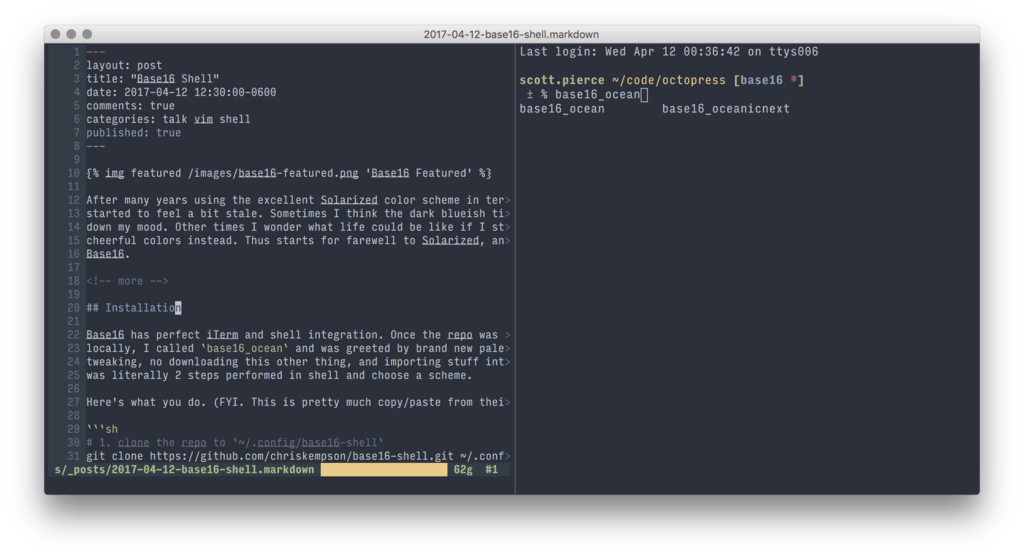 After many years using the excellent Solarized color scheme, it has
started to feel stale. Sometimes I think the dark blueish tint brings
down my mood. Other times, I wonder what life could be like if I stared at more
cheerful colors. Thus starts my farewell from Solarized, and hello to
Base16.
From Base16's [Github README](https://github.com/chriskempson/base16):
> Base16 provides carefully chosen syntax highlighting and a default set of
> sixteen colors suitable for a wide range of applications. Base16 is not a
> single theme but a set of guidelines with numerous implementations.
Which means after integrating into Base16 once, I'll have access to an
unlimited supply of themes in the future!
## Installation
Base16 has perfect iTerm and shell integration. Once the repo was installed
locally, I called `base16_ocean` and was greeted by brand new palette. No iTerm
tweaking, no downloading this other thing and importing stuff into iTerm. It was
literally 2 steps performed in shell and then pick a theme.
Here's what you do. (FYI. This is pretty much copy/paste from their repo)
```sh
# 1. clone the repo to `~/.config/base16-shell`
git clone https://github.com/chriskempson/base16-shell.git ~/.config/base16-shell
# 2. update ~/.bashrc or ~/.zshrc
cat >> ~/.zshrc <<'SH'
BASE16_SHELL=$HOME/.config/base16-shell/
[ -n "$PS1" ] && [ -s $BASE16_SHELL/profile_helper.sh ] && eval "$($BASE16_SHELL/profile_helper.sh)"
SH
```
After you're done with those steps, start a new terminal session or source the
file, and start choosing a theme. Try `base16_ocean` to see what I'm seeing. Try
`base16_` to see what other options you have available. To preview what
they look like before making a choice go to their website:
https://chriskempson.github.io/base16/.
## Vim Integration
Install plugin from https://github.com/chriskempson/base16-vim.
Add the following to your `.vimrc`:
```vim
if filereadable(expand("~/.vimrc_background"))
let base16colorspace=256
source ~/.vimrc_background
endif
```
`base16-shell` commands create the `~/.vimrc_background` file every time a
`base16_*` alias is used. This allows Vim to always stay synchronized with
shell which is AWESOME!
## Conclusion
After cycling through everyone of the user created themes, I've settled on
`base16_ocean` as my new home. I may get tired of it, I may not, but either way
I'm just a shell command away from changing. Indecision has never been so easy.
After many years using the excellent Solarized color scheme, it has
started to feel stale. Sometimes I think the dark blueish tint brings
down my mood. Other times, I wonder what life could be like if I stared at more
cheerful colors. Thus starts my farewell from Solarized, and hello to
Base16.
From Base16's [Github README](https://github.com/chriskempson/base16):
> Base16 provides carefully chosen syntax highlighting and a default set of
> sixteen colors suitable for a wide range of applications. Base16 is not a
> single theme but a set of guidelines with numerous implementations.
Which means after integrating into Base16 once, I'll have access to an
unlimited supply of themes in the future!
## Installation
Base16 has perfect iTerm and shell integration. Once the repo was installed
locally, I called `base16_ocean` and was greeted by brand new palette. No iTerm
tweaking, no downloading this other thing and importing stuff into iTerm. It was
literally 2 steps performed in shell and then pick a theme.
Here's what you do. (FYI. This is pretty much copy/paste from their repo)
```sh
# 1. clone the repo to `~/.config/base16-shell`
git clone https://github.com/chriskempson/base16-shell.git ~/.config/base16-shell
# 2. update ~/.bashrc or ~/.zshrc
cat >> ~/.zshrc <<'SH'
BASE16_SHELL=$HOME/.config/base16-shell/
[ -n "$PS1" ] && [ -s $BASE16_SHELL/profile_helper.sh ] && eval "$($BASE16_SHELL/profile_helper.sh)"
SH
```
After you're done with those steps, start a new terminal session or source the
file, and start choosing a theme. Try `base16_ocean` to see what I'm seeing. Try
`base16_` to see what other options you have available. To preview what
they look like before making a choice go to their website:
https://chriskempson.github.io/base16/.
## Vim Integration
Install plugin from https://github.com/chriskempson/base16-vim.
Add the following to your `.vimrc`:
```vim
if filereadable(expand("~/.vimrc_background"))
let base16colorspace=256
source ~/.vimrc_background
endif
```
`base16-shell` commands create the `~/.vimrc_background` file every time a
`base16_*` alias is used. This allows Vim to always stay synchronized with
shell which is AWESOME!
## Conclusion
After cycling through everyone of the user created themes, I've settled on
`base16_ocean` as my new home. I may get tired of it, I may not, but either way
I'm just a shell command away from changing. Indecision has never been so easy.