---
title: "Yank Without Jank"
date: 2016-04-25
created: 2016-04-25T00:00:00Z
type: blog
status: settled
tags: [vim]
publish: [ddrscott]
source: import
image: /images/yank-default.gif
prompt: "Import from blog post: 2016/yank-without-jank.markdown"
---
# Yank Without Jank
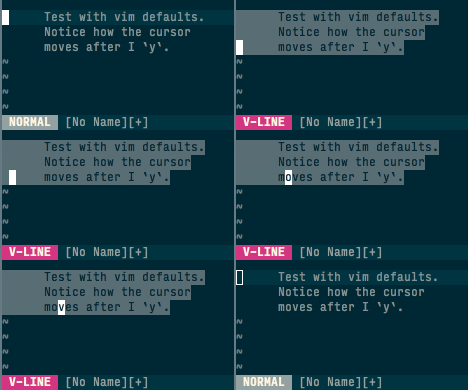 For all the great things Vim has to offer, it still has some inconsistencies with
basic editors that I simply can't unlearn. One of these nasties is moving the cursor
after a visual yank. Go ahead, try it: `vipy`. Where's your cursor? Where did
you expect it to be located? When you're in a boring editor and do
`shift-down-down-down `, where's your cursor? Where did you expect it
to be located? This janky behaviour always throws me off for a moment, then I
compose myself, do a `` to jump to the end of my selection, and `p`.
There must be a better way!
## Solution A
Rebind `y` to do exactly what we did above:
```vim
vnoremap y y`>
```
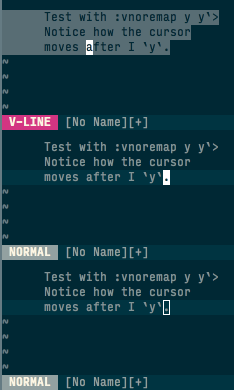
This work and I lived with it for a few minutes, but it still wasn't perfect. I
noticed when I do line select using capital `V` the cursor would still move. The
vertical motion was perfect, but horizontal motion was still jarring.
For all the great things Vim has to offer, it still has some inconsistencies with
basic editors that I simply can't unlearn. One of these nasties is moving the cursor
after a visual yank. Go ahead, try it: `vipy`. Where's your cursor? Where did
you expect it to be located? When you're in a boring editor and do
`shift-down-down-down `, where's your cursor? Where did you expect it
to be located? This janky behaviour always throws me off for a moment, then I
compose myself, do a `` to jump to the end of my selection, and `p`.
There must be a better way!
## Solution A
Rebind `y` to do exactly what we did above:
```vim
vnoremap y y`>
```
This work and I lived with it for a few minutes, but it still wasn't perfect. I
noticed when I do line select using capital `V` the cursor would still move. The
vertical motion was perfect, but horizontal motion was still jarring.
 ## Solution B
Let's try using marks to keep things in place:
```vim
vnoremap y myy`y
vnoremap Y myY`y
```
## Solution B
Let's try using marks to keep things in place:
```vim
vnoremap y myy`y
vnoremap Y myY`y
```
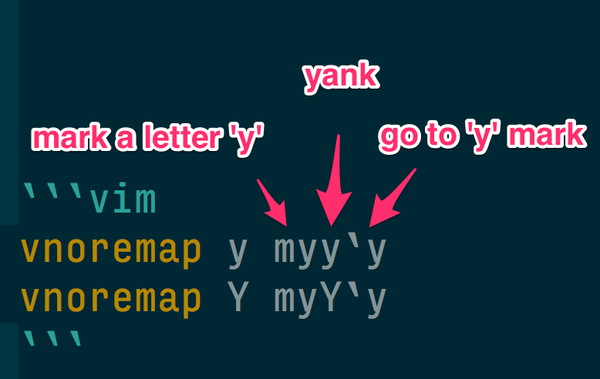 The capital `Y` mapping is just in case we want to do a line wise yank from a
character wise selection.
The capital `Y` mapping is just in case we want to do a line wise yank from a
character wise selection.
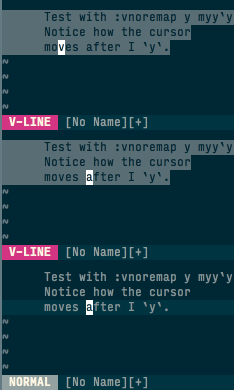 Like a well trained dog, the cursor stays even though you yank it.
**BONUS** This snippet also takes over the `y` marker, so you can manually
`y` at a later time to continue yanking where you left off. This is great when
you're moving a lot of stuff around and want pick up where you last were. You
can also change the mark to capitals in the binding so it spans buffers, too.
## Closing
I've been using this setting for a while and noticed my blood pressure is way
down. No more yank anxiety means I'm a step closer to editing utopia!
Let me know how this goes for you in the comments below.
## Updates from Comments
Commenter @Krzysztof noticed Solution B wasn't allowing the user to specify
the target register. He was awesome enough to update the solution. Here's his
solution:
```vim
vnoremap y "my\"" . v:register . "y`y"
```
I've updated `$MYVIMRC` and it works great.
Thanks @Krzysztof for being awesome!
Like a well trained dog, the cursor stays even though you yank it.
**BONUS** This snippet also takes over the `y` marker, so you can manually
`y` at a later time to continue yanking where you left off. This is great when
you're moving a lot of stuff around and want pick up where you last were. You
can also change the mark to capitals in the binding so it spans buffers, too.
## Closing
I've been using this setting for a while and noticed my blood pressure is way
down. No more yank anxiety means I'm a step closer to editing utopia!
Let me know how this goes for you in the comments below.
## Updates from Comments
Commenter @Krzysztof noticed Solution B wasn't allowing the user to specify
the target register. He was awesome enough to update the solution. Here's his
solution:
```vim
vnoremap y "my\"" . v:register . "y`y"
```
I've updated `$MYVIMRC` and it works great.
Thanks @Krzysztof for being awesome!