---
title: "Sensible Horizontal Scroll in Vim"
date: 2016-05-05
created: 2016-05-05T00:00:00Z
type: blog
status: settled
tags: [vim]
publish: [ddrscott]
source: import
image: /images/sidescroll-feature.png
prompt: "Import from blog post: 2016/sidescroll.markdown"
---
# Sensible Horizontal Scroll in Vim
 Sometimes it's the little things that make a big difference, and this is about
as small as it can get. Occasionally, I hold down `l`, `w`, or `e` to view long
lines which have disappeared off the window. It's a bad habit and the penalty
always ruins my concentration. But after I found this setting, I'm free
to cursor around like an innocent child unaware of death.
*TL;DR* -- `set sidescroll=1`
## Problem
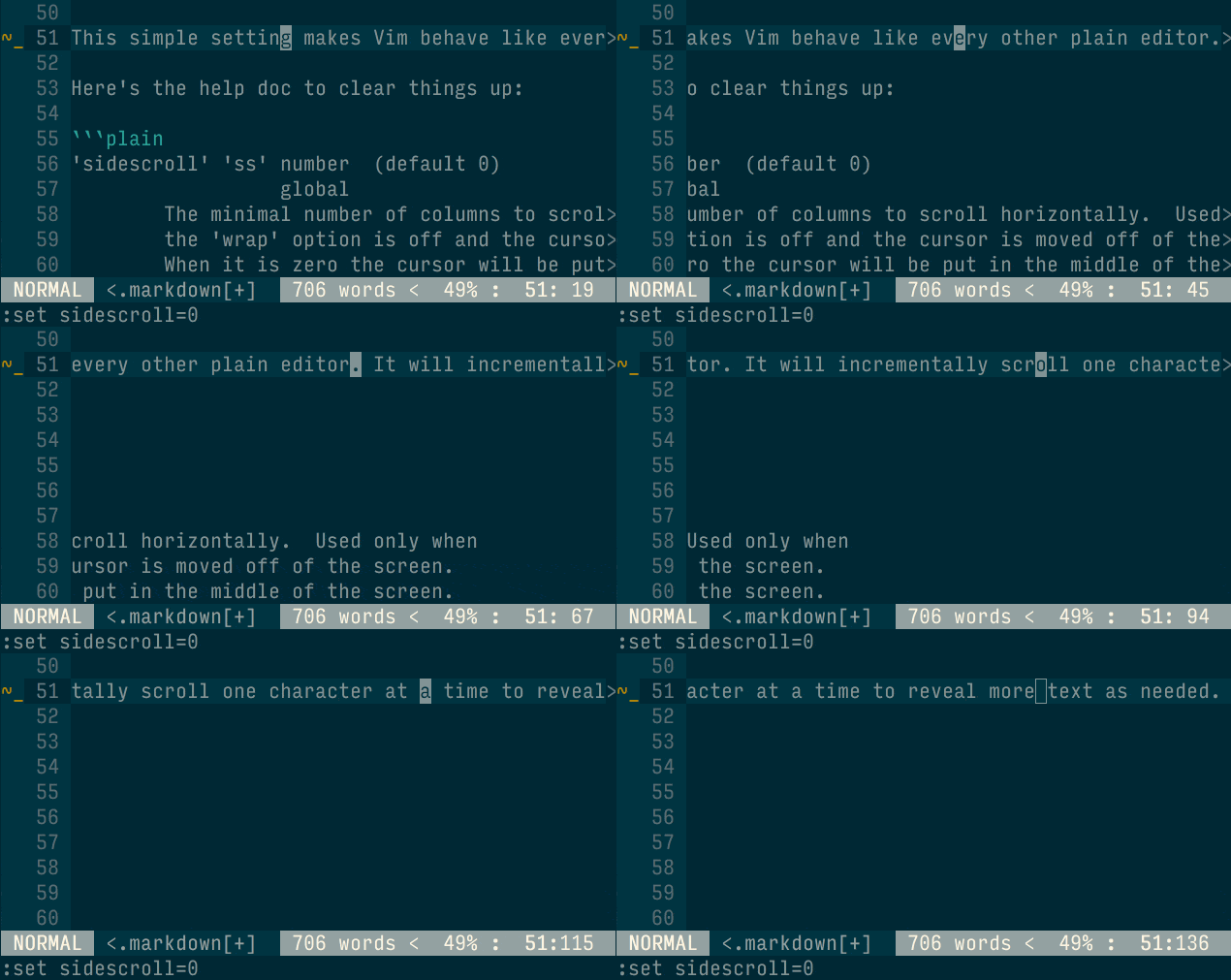
When `set wrap` is off, otherwise known as `set nowrap`, and a line is longer
than the window can handle, you'll need to scroll to see more of the line.
`{x}zl` and `{x}zh` will scroll the screen right and left respectively.
That's a lot to remember to see some more text. Which leads me to hold
down `w` or `e` to get it done followed by janky behavior when the
cursor gets to the edge of the window. The default behavior of revealing more
text is 1/2 a window width at a time. This abrupt jump throws off my fragile
concentration.
Sometimes it's the little things that make a big difference, and this is about
as small as it can get. Occasionally, I hold down `l`, `w`, or `e` to view long
lines which have disappeared off the window. It's a bad habit and the penalty
always ruins my concentration. But after I found this setting, I'm free
to cursor around like an innocent child unaware of death.
*TL;DR* -- `set sidescroll=1`
## Problem
When `set wrap` is off, otherwise known as `set nowrap`, and a line is longer
than the window can handle, you'll need to scroll to see more of the line.
`{x}zl` and `{x}zh` will scroll the screen right and left respectively.
That's a lot to remember to see some more text. Which leads me to hold
down `w` or `e` to get it done followed by janky behavior when the
cursor gets to the edge of the window. The default behavior of revealing more
text is 1/2 a window width at a time. This abrupt jump throws off my fragile
concentration.
 ## Solution A
Turn on word wrapping. `set wrap`. Boring, but effective. You might also want
to make word wrapping look nicer. I do that with the following settings.
```vim
set breakindent
set breakindentopt=sbr
" I use a unicode curly array with a
set showbreak=↪>\
```
This of course doesn't solve the problem if, in fact, we want wrapping off.
## Solution B
```vim
set sidescroll=1
```
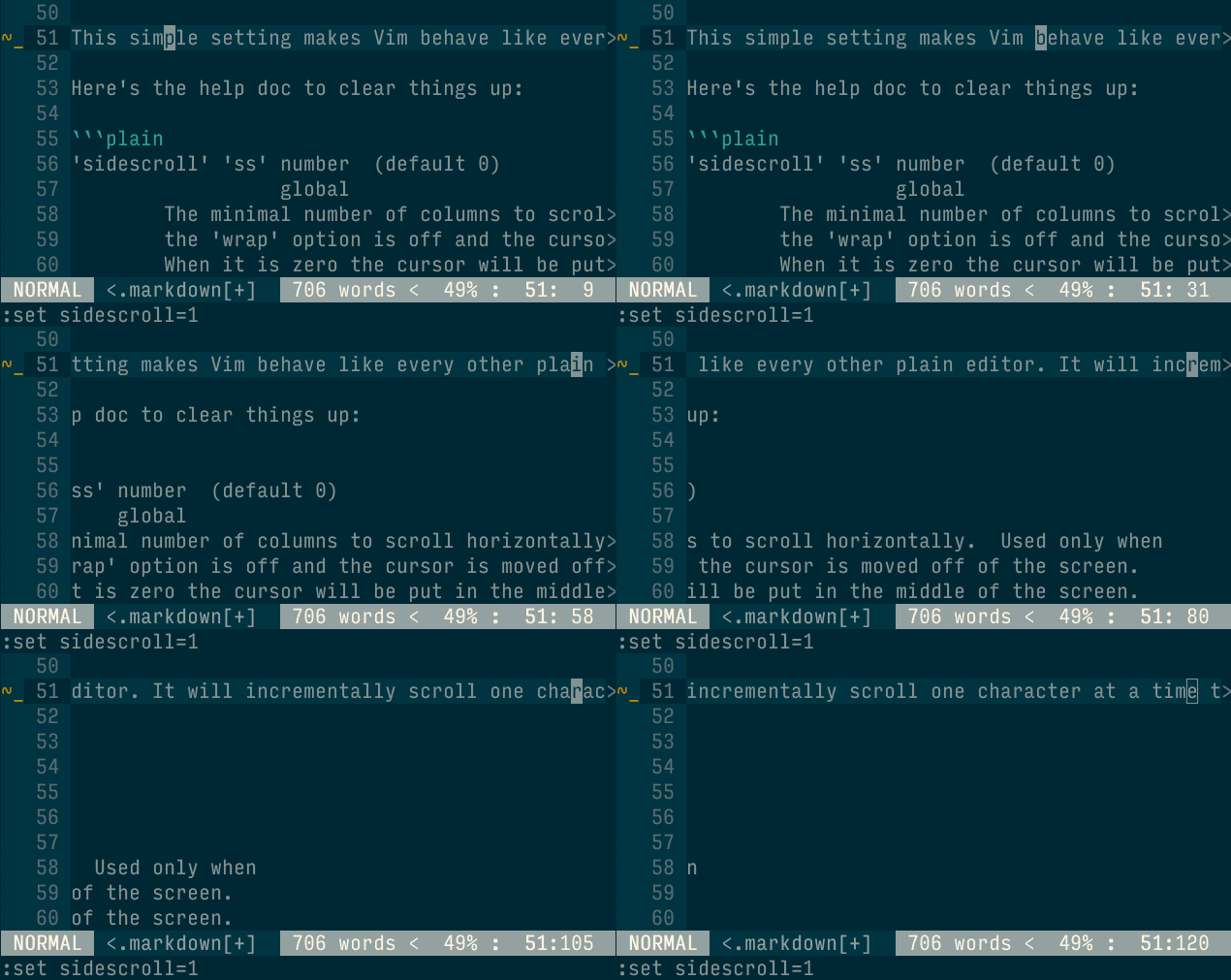
This simple setting makes Vim behave like every other plain editor. It will
incrementally scroll one character at a time to reveal more text as needed.
## Solution A
Turn on word wrapping. `set wrap`. Boring, but effective. You might also want
to make word wrapping look nicer. I do that with the following settings.
```vim
set breakindent
set breakindentopt=sbr
" I use a unicode curly array with a
set showbreak=↪>\
```
This of course doesn't solve the problem if, in fact, we want wrapping off.
## Solution B
```vim
set sidescroll=1
```
This simple setting makes Vim behave like every other plain editor. It will
incrementally scroll one character at a time to reveal more text as needed.
 Here's the help doc to clear things up:
```plain
'sidescroll' 'ss' number (default 0)
global
The minimal number of columns to scroll horizontally. Used only when
the 'wrap' option is off and the cursor is moved off of the screen.
When it is zero the cursor will be put in the middle of the screen.
When using a slow terminal set it to a large number or 0. When using
a fast terminal use a small number or 1. Not used for "zh" and "zl"
commands.
'sidescrolloff' 'siso' number (default 0)
global
The minimal number of screen columns to keep to the left and to the
right of the cursor if 'nowrap' is set. Setting this option to a
value greater than 0 while having |'sidescroll'| also at a non-zero
value makes some context visible in the line you are scrolling in
horizontally (except at beginning of the line). Setting this option
to a large value (like 999) has the effect of keeping the cursor
horizontally centered in the window, as long as one does not come too
close to the beginning of the line.
Example: Try this together with 'sidescroll' and 'listchars' as
in the following example to never allow the cursor to move
onto the "extends" character:
:set nowrap sidescroll=1 listchars=extends:>,precedes:<
:set sidescrolloff=1
```
Seems like the default was intended for a "slow terminal". If you're using a
slow terminal while editing a large amount of unwrapped text, I'd recommend
getting a computer from this millennia and enabling `sidescroll`.
Also note that a sensible example is shown in the `sidescrolloff` section.
## Off Topic...
It's interesting to study all the decisions made due to slow terminals.
Try `:help slow-terminal` for a quick look and try `:helpgrep slow` to see way
more mentions. Use `:help helpgrep` if you didn't know about `helpgrep` :)
## Closing
I'm sure you're thinking why so many words were written for a single setting.
Similar to my previous post about [Yank without Jank](/blog/2016/yank-without-jank/),
these unexpected janky behaviors cause anxiety. Anxiety that usually can't be
identified or resolved in the heat of a coding session, but is there, wading in
the weeds, ready to pounce at your next stray keystroke. As a student of Vim, I
want identify and resolve these issues so I can get back to why I like Vim;
using the dot operator.
Here's the help doc to clear things up:
```plain
'sidescroll' 'ss' number (default 0)
global
The minimal number of columns to scroll horizontally. Used only when
the 'wrap' option is off and the cursor is moved off of the screen.
When it is zero the cursor will be put in the middle of the screen.
When using a slow terminal set it to a large number or 0. When using
a fast terminal use a small number or 1. Not used for "zh" and "zl"
commands.
'sidescrolloff' 'siso' number (default 0)
global
The minimal number of screen columns to keep to the left and to the
right of the cursor if 'nowrap' is set. Setting this option to a
value greater than 0 while having |'sidescroll'| also at a non-zero
value makes some context visible in the line you are scrolling in
horizontally (except at beginning of the line). Setting this option
to a large value (like 999) has the effect of keeping the cursor
horizontally centered in the window, as long as one does not come too
close to the beginning of the line.
Example: Try this together with 'sidescroll' and 'listchars' as
in the following example to never allow the cursor to move
onto the "extends" character:
:set nowrap sidescroll=1 listchars=extends:>,precedes:<
:set sidescrolloff=1
```
Seems like the default was intended for a "slow terminal". If you're using a
slow terminal while editing a large amount of unwrapped text, I'd recommend
getting a computer from this millennia and enabling `sidescroll`.
Also note that a sensible example is shown in the `sidescrolloff` section.
## Off Topic...
It's interesting to study all the decisions made due to slow terminals.
Try `:help slow-terminal` for a quick look and try `:helpgrep slow` to see way
more mentions. Use `:help helpgrep` if you didn't know about `helpgrep` :)
## Closing
I'm sure you're thinking why so many words were written for a single setting.
Similar to my previous post about [Yank without Jank](/blog/2016/yank-without-jank/),
these unexpected janky behaviors cause anxiety. Anxiety that usually can't be
identified or resolved in the heat of a coding session, but is there, wading in
the weeds, ready to pounce at your next stray keystroke. As a student of Vim, I
want identify and resolve these issues so I can get back to why I like Vim;
using the dot operator.