---
title: "Making a Window Submode in Vim"
date: 2016-04-29
created: 2016-04-29T00:00:00Z
type: blog
status: settled
tags: [vim]
publish: [ddrscott]
source: import
image: /images/window-mode-feature.png
prompt: "Import from blog post: 2016/making-a-window-submode.markdown"
---
# Making a Window Submode in Vim
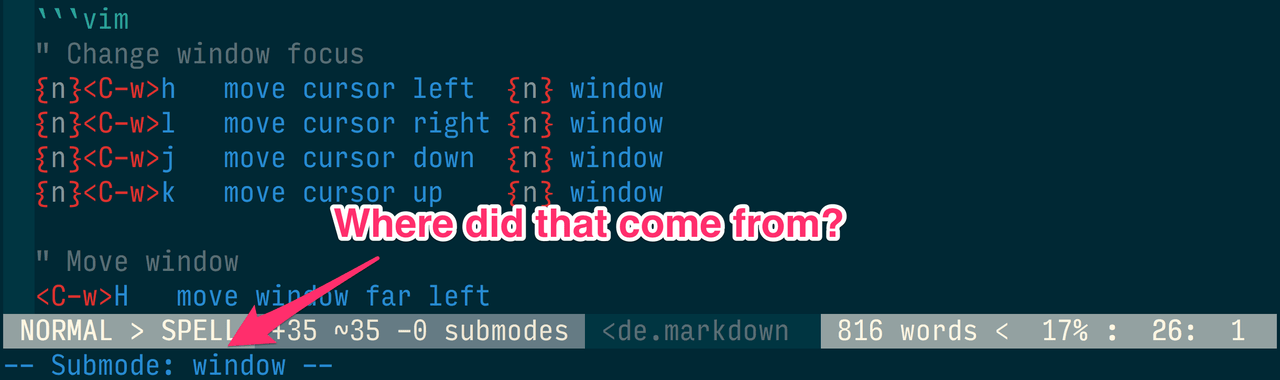 I found a plugin that is changing my Vim-tire life! This
[plugin](https://github.com/kana/vim-submode) is so awesome it should be
built into default Vim. What does the [plugin](https://github.com/kana/vim-submode)
do? It enables the creation of new submodes. Why would a person want *more* modes?!?
Isn't dealing with modes the main deterrent for new Vim users? Isn't Normal,
Insert, Command-line, Visual, Select, and Operator-pending enough? (Did I miss one?)
Let's try out a new submode and see what happens.
## Problem
Window commands are prefixed with ``. Want to create a horizontal split?
Try `s`, didn't mean to do that and want to do vertical split? `qv`.
Want to resize the vertical split `50>`? Too wide? Narrow it with `5<`.
Move back to the other window? `p` or `w`.
Are your fingers getting tired? After I get the windows just right using default
mappings my fingers are crying for mercy.
Here's a short list of common default window commands:
```vim
" Change window focus
{n}h move cursor left {n} window
{n}l move cursor right {n} window
{n}j move cursor down {n} window
{n}k move cursor up {n} window
" Move window
H move window far left
L move window far right
J move window far bottom
K move window far top
" Change size
{n}+ increase height by {n} rows
{n}- decrease height by {n} rows
{n}< decrease width by {n} columns
{n}> increase width by {n} columns
| maximize width
_ maximize height
= equalize sizes
```
For a comprehensive list of window commands try `:help windows.txt`.
## Solution A
The most common solution to window-command-itis is to map other keys to these
common actions so to include the `` prefix.
From [spf13-vim](https://github.com/spf13/spf13-vim/blob/3.0/.vimrc):
```vim
map j_
map k_
map l_
map h_
" Note: They go one extra by maximizing the height after entering the split.
```
From [Thoughbot](https://robots.thoughtbot.com/vim-splits-move-faster-and-more-naturally):
```vim
nnoremap
nnoremap
nnoremap
nnoremap
```
This has been the accepted solution for most, but it takes away so many
convenient keys. And in some cases, it even overrides default behaviour.
``, I miss you. `C-H`, isn't that also ``? Guess I won't be using
you either.
## Solution B - Submode to the Rescue
This entire solution depends on [kana/vim-submode](https://github.com/kana/vim-submode.git),
I consider it one of Japan's national treasures along with ninjas and ramen.
Unfortunately, Kana's example use of submodes is a little underwhelming:
undo/redo using `g-` and `g+`. I agree with the author that using `g-` and
`g+` is not convenient, and using `g++++-++-+` is easier, but the solution
for that was simply `u` and ``. I feel a better application for a new
submode is window management. Imagine if resizing a split was `++++++++`
or `------=->>>>>>>><>` or changing cursor location was `hjlll`
or moving was `HjKLkjh`. Imagine no more!
First, install the plugin. If you're not sure how to install a plugin, try
[junegunn/vim-plug](https://github.com/junegunn/vim-plug). Next, add the
following to your `$MYVIMRC`.
```vim
" A message will appear in the message line when you're in a submode
" and stay there until the mode has existed.
let g:submode_always_show_submode = 1
" We're taking over the default setting. Don't worry we'll do
" our best to put back the default functionality.
call submode#enter_with('window', 'n', '', '')
" Note: will also get you out to the mode without this mapping.
" Note: also behaves as
call submode#leave_with('window', 'n', '', '')
" Go through every letter
for key in ['a','b','c','d','e','f','g','h','i','j','k','l','m',
\ 'n','o','p','q','r','s','t','u','v','w','x','y','z']
" maps lowercase, uppercase and
call submode#map('window', 'n', '', key, '' . key)
call submode#map('window', 'n', '', toupper(key), '' . toupper(key))
call submode#map('window', 'n', '', '', '' . '')
endfor
" Go through symbols. Sadly, '|', not supported in submode plugin.
for key in ['=','_','+','-','<','>']
call submode#map('window', 'n', '', key, '' . key)
endfor
" Old way, just in case.
nnoremap w
```
After `:source $MYVIMRC`, you'll have a glorious new submode in Vim.
You can see I named it *window* mode. Can you guess how to get into *window* mode?
``, the normal prefix used to do any `wincmd`. If this is too drastic, feel
free to change line #7 to something else. Just replace `` with a different
normal mapping.
Let's give it a test drive.
I found a plugin that is changing my Vim-tire life! This
[plugin](https://github.com/kana/vim-submode) is so awesome it should be
built into default Vim. What does the [plugin](https://github.com/kana/vim-submode)
do? It enables the creation of new submodes. Why would a person want *more* modes?!?
Isn't dealing with modes the main deterrent for new Vim users? Isn't Normal,
Insert, Command-line, Visual, Select, and Operator-pending enough? (Did I miss one?)
Let's try out a new submode and see what happens.
## Problem
Window commands are prefixed with ``. Want to create a horizontal split?
Try `s`, didn't mean to do that and want to do vertical split? `qv`.
Want to resize the vertical split `50>`? Too wide? Narrow it with `5<`.
Move back to the other window? `p` or `w`.
Are your fingers getting tired? After I get the windows just right using default
mappings my fingers are crying for mercy.
Here's a short list of common default window commands:
```vim
" Change window focus
{n}h move cursor left {n} window
{n}l move cursor right {n} window
{n}j move cursor down {n} window
{n}k move cursor up {n} window
" Move window
H move window far left
L move window far right
J move window far bottom
K move window far top
" Change size
{n}+ increase height by {n} rows
{n}- decrease height by {n} rows
{n}< decrease width by {n} columns
{n}> increase width by {n} columns
| maximize width
_ maximize height
= equalize sizes
```
For a comprehensive list of window commands try `:help windows.txt`.
## Solution A
The most common solution to window-command-itis is to map other keys to these
common actions so to include the `` prefix.
From [spf13-vim](https://github.com/spf13/spf13-vim/blob/3.0/.vimrc):
```vim
map j_
map k_
map l_
map h_
" Note: They go one extra by maximizing the height after entering the split.
```
From [Thoughbot](https://robots.thoughtbot.com/vim-splits-move-faster-and-more-naturally):
```vim
nnoremap
nnoremap
nnoremap
nnoremap
```
This has been the accepted solution for most, but it takes away so many
convenient keys. And in some cases, it even overrides default behaviour.
``, I miss you. `C-H`, isn't that also ``? Guess I won't be using
you either.
## Solution B - Submode to the Rescue
This entire solution depends on [kana/vim-submode](https://github.com/kana/vim-submode.git),
I consider it one of Japan's national treasures along with ninjas and ramen.
Unfortunately, Kana's example use of submodes is a little underwhelming:
undo/redo using `g-` and `g+`. I agree with the author that using `g-` and
`g+` is not convenient, and using `g++++-++-+` is easier, but the solution
for that was simply `u` and ``. I feel a better application for a new
submode is window management. Imagine if resizing a split was `++++++++`
or `------=->>>>>>>><>` or changing cursor location was `hjlll`
or moving was `HjKLkjh`. Imagine no more!
First, install the plugin. If you're not sure how to install a plugin, try
[junegunn/vim-plug](https://github.com/junegunn/vim-plug). Next, add the
following to your `$MYVIMRC`.
```vim
" A message will appear in the message line when you're in a submode
" and stay there until the mode has existed.
let g:submode_always_show_submode = 1
" We're taking over the default setting. Don't worry we'll do
" our best to put back the default functionality.
call submode#enter_with('window', 'n', '', '')
" Note: will also get you out to the mode without this mapping.
" Note: also behaves as
call submode#leave_with('window', 'n', '', '')
" Go through every letter
for key in ['a','b','c','d','e','f','g','h','i','j','k','l','m',
\ 'n','o','p','q','r','s','t','u','v','w','x','y','z']
" maps lowercase, uppercase and
call submode#map('window', 'n', '', key, '' . key)
call submode#map('window', 'n', '', toupper(key), '' . toupper(key))
call submode#map('window', 'n', '', '', '' . '')
endfor
" Go through symbols. Sadly, '|', not supported in submode plugin.
for key in ['=','_','+','-','<','>']
call submode#map('window', 'n', '', key, '' . key)
endfor
" Old way, just in case.
nnoremap w
```
After `:source $MYVIMRC`, you'll have a glorious new submode in Vim.
You can see I named it *window* mode. Can you guess how to get into *window* mode?
``, the normal prefix used to do any `wincmd`. If this is too drastic, feel
free to change line #7 to something else. Just replace `` with a different
normal mapping.
Let's give it a test drive.
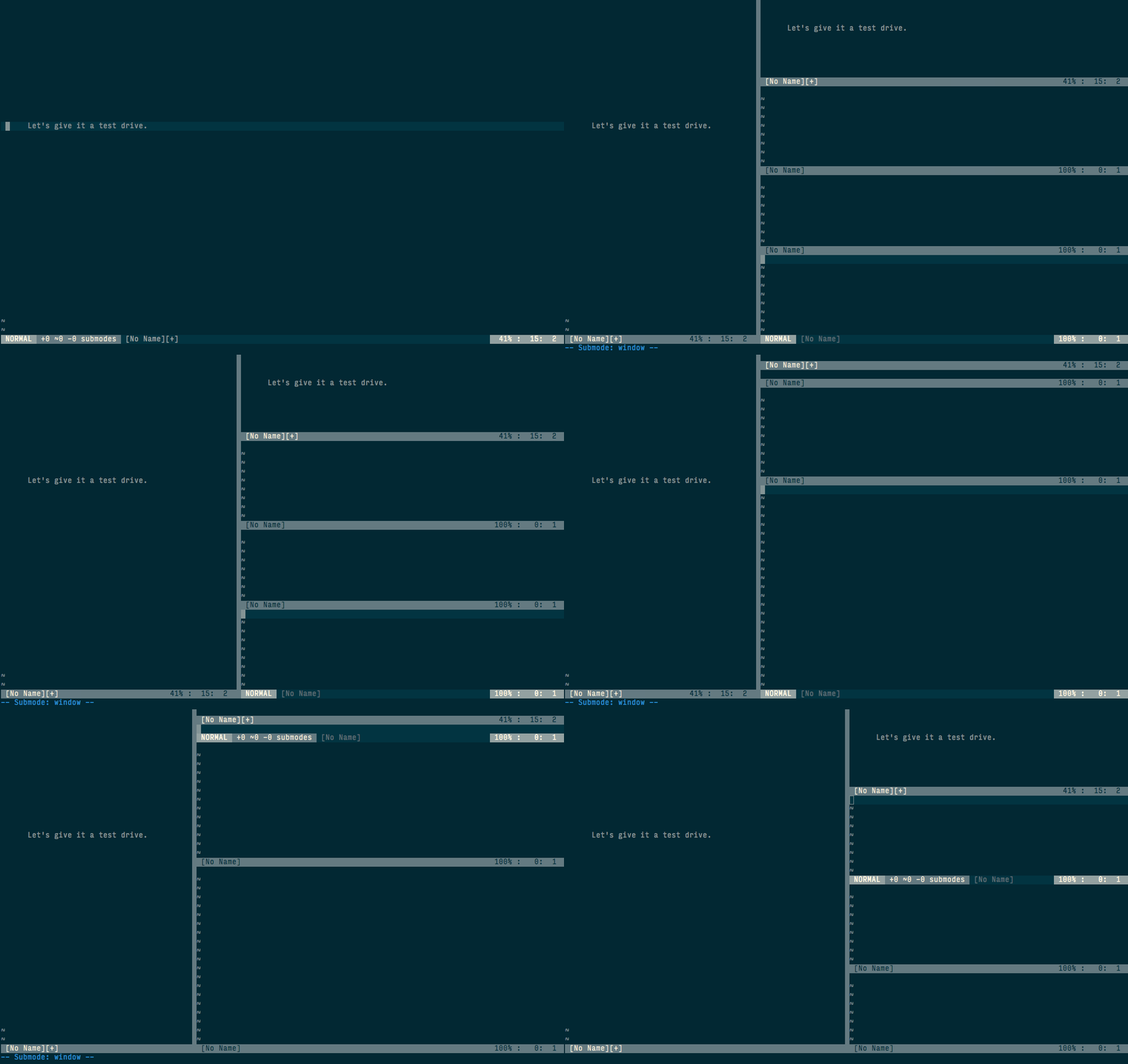 I know you can't see what keys I'm pressing, but I guarantee I only pressed
`` once. I also didn't have to remember any new key bindings. The
hesitation in the demo is the resistance to hitting `` every time, which
I'll get over soon enough.
## Bonus Mappings
But wait there's more! In case I haven't provided enough tips for one post,
here's the overrides I have in `$MYVIMRC` to make windowing even better.
```vim
" I don't like q, c won't exit Vim when it's the last window.
call submode#map('window', 'n', '', 'q', 'c')
call submode#map('window', 'n', '', '', 'c')
" sets the width to 80 columns, pipe () by default
" maximizes the width.
call submode#map('window', 'n', '', '\', ':vertical resize 80')
" Resize faster
call submode#map('window', 'n', '', '+', '3+')
call submode#map('window', 'n', '', '-', '3-')
call submode#map('window', 'n', '', '<', '10<')
call submode#map('window', 'n', '', '>', '10>')
```
## Rainbows without Unicorns
While learning this new way of windowing, there have been a few negatives:
1. I forget that I'm in window mode and get disoriented when I think I'm moving
the cursor within a buffer, but it jumps around to other splits.
2. For one off window commands, I have to hit an extra key to get out of window
mode or wait for the timeout.
3. When I use some one else's computer, I'm useless.
I think most of these annoyances will go away with time, and the benefits
overtime in keystroke savings are non-trivial. As for #3, regardless of submodes,
the brain freeze will never go away, because no one thinks as strangely as me,
and that's a Good Thing™.
## Thanks
Shout-out to Kana Natsuno, @kana1, http://whileimautomaton.net/, https://github.com/kana . None
of this awesomeness would be possible without https://github.com/kana/vim-submode . She
makes some totally sweet plug-ins. Check out her stuff. You won't regret it!
Let me know what you think. Am I crazy? What other things deserve a submode?
Hit me up in the comments below! Thanks for reading!
I know you can't see what keys I'm pressing, but I guarantee I only pressed
`` once. I also didn't have to remember any new key bindings. The
hesitation in the demo is the resistance to hitting `` every time, which
I'll get over soon enough.
## Bonus Mappings
But wait there's more! In case I haven't provided enough tips for one post,
here's the overrides I have in `$MYVIMRC` to make windowing even better.
```vim
" I don't like q, c won't exit Vim when it's the last window.
call submode#map('window', 'n', '', 'q', 'c')
call submode#map('window', 'n', '', '', 'c')
" sets the width to 80 columns, pipe () by default
" maximizes the width.
call submode#map('window', 'n', '', '\', ':vertical resize 80')
" Resize faster
call submode#map('window', 'n', '', '+', '3+')
call submode#map('window', 'n', '', '-', '3-')
call submode#map('window', 'n', '', '<', '10<')
call submode#map('window', 'n', '', '>', '10>')
```
## Rainbows without Unicorns
While learning this new way of windowing, there have been a few negatives:
1. I forget that I'm in window mode and get disoriented when I think I'm moving
the cursor within a buffer, but it jumps around to other splits.
2. For one off window commands, I have to hit an extra key to get out of window
mode or wait for the timeout.
3. When I use some one else's computer, I'm useless.
I think most of these annoyances will go away with time, and the benefits
overtime in keystroke savings are non-trivial. As for #3, regardless of submodes,
the brain freeze will never go away, because no one thinks as strangely as me,
and that's a Good Thing™.
## Thanks
Shout-out to Kana Natsuno, @kana1, http://whileimautomaton.net/, https://github.com/kana . None
of this awesomeness would be possible without https://github.com/kana/vim-submode . She
makes some totally sweet plug-ins. Check out her stuff. You won't regret it!
Let me know what you think. Am I crazy? What other things deserve a submode?
Hit me up in the comments below! Thanks for reading!